

Motion Detector Light Troubleshooting helps you find and fix sensor, power, or wiring issues fast.
I have spent years installing and repairing outdoor lighting and smart sensors. This guide on Motion Detector Light Troubleshooting pulls together hands-on tips, clear diagnostics, and practical fixes. You will learn how to spot common faults, test parts safely, and decide when to repair or replace. Read on to get fast results and save time and money.

36% off Today’s Exclusive Deals
Limited-time Exclusive Deals. Check current discount on Amazon.
Check Price on Amazon As an Amazon Associate I earn from qualifying purchases.
Common signs your motion detector light needs troubleshooting
Motion Detector Light Troubleshooting starts with knowing the signs. Watch for these clear symptoms.
- Light never turns on when motion is present. This points to power, sensor, or wiring problems.
- Light stays on constantly after being triggered. This often means timer or sensitivity settings are wrong.
- Light flickers or behaves erratically. This can be loose wiring, a failing bulb, or electrical noise.
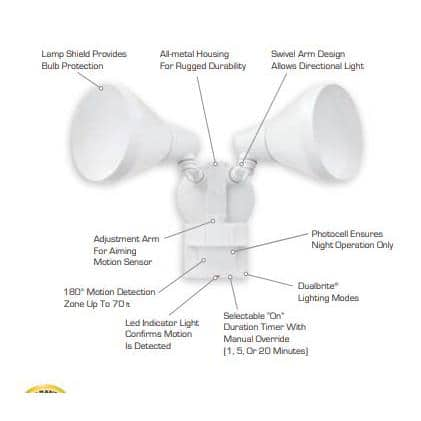
- Light only works in daylight or at night. This shows issues with the dusk-to-dawn sensor or ambient light setting.
- Sensor triggers too often or misses people. This is usually sensitivity, range, or placement trouble.
Recognizing the symptom narrows the troubleshooting steps. Start simple and work outward. Motion Detector Light Troubleshooting becomes faster when you match a symptom to a likely cause.
Quick safety checks before you begin troubleshooting
Before any Motion Detector Light Troubleshooting, prioritize safety. Power and ladders create risks.
- Turn off power at the breaker before opening fixtures.
- Use a stable ladder and someone to hold it when working high.
- Wear insulated gloves when touching wiring.
- Keep water and moisture away from tools and fixtures.
- If you feel unsure about electrical work, call a licensed electrician.
Safety reduces mistakes and speeds repair. I have seen casual fixes turn costly when safety was ignored. Take five minutes to secure the area and tools.
Step-by-step Motion Detector Light Troubleshooting process
Follow a clear process to diagnose problems. These steps move from easy fixes to more technical checks.
- Check the power source
- Confirm the breaker is on and the fuse is OK.
- Test the fixture with a known-good bulb to rule out the lamp.
- Inspect the sensor settings
- Reset sensitivity and time delay to default.
- Test the light at different distances and angles.
- Rule out ambient light interference
- Cover the photocell gently to simulate darkness and see if the light triggers.
- Look for loose or damaged wires
- Turn off power and inspect wire nuts and connections.
- Tighten any loose terminals and replace frayed wires.
- Test the motion sensor module
- For plug-in or modular sensors, swap with a spare or replace temporarily.
- Check for electrical noise or voltage drop
- Use a multimeter to confirm steady voltage at the fixture.
- Look for operations on the same circuit that cause flicker.
- Consider environmental factors
- Nearby heat sources, branches, or traffic can cause false triggers.
- Reposition the sensor for a clearer field of view.
Work methodically. I troubleshoot many lights this way and catch most failures before replacing expensive parts.
Tools and tests to use during troubleshooting
Right tools make Motion Detector Light Troubleshooting faster and safer.
- Digital multimeter for voltage and continuity checks.
- Non-contact voltage tester for quick live checks.
- Screwdrivers and wire strippers for opening fixtures and repairing wiring.
- Replacement bulbs (LED and incandescent) to test lamp compatibility.
- Small mirror and flashlight to inspect hidden wires.
- Spray bottle for cleaning lenses and removing cobwebs.
Use tests step-by-step. A multimeter reading can save an unnecessary part swap. I keep a basic kit in my truck for quick field fixes.

Common causes and how to fix them
Understanding root causes helps you apply the right fix during Motion Detector Light Troubleshooting.
- Bad bulbs or incompatible LEDs
- Replace with bulbs matched to the fixture's wattage and type.
- Loose wiring or corroded connections
- Cut back corroded wire, re-strip, and use proper wire connectors.
- Faulty sensor module
- Swap the sensor module or replace the fixture if the sensor is sealed.
- Misadjusted sensitivity or timer
- Read the manual and set sensitivity, range, and time correctly.
- Photocell or ambient light failure
- Clean the photocell or replace it if it does not change state when covered.
- Environmental triggers
- Trim vegetation, redirect sensor, or change detection angle.
- Voltage problems on the circuit
- Check for shared loads and consult an electrician for panel issues.
I once diagnosed a porch lamp that never shut off. It was a broken photocell masked by overgrown ivy. Simple trimming and a new photocell fixed it in minutes.
When to replace parts or the entire fixture
Not every problem needs a full replacement. Use Motion Detector Light Troubleshooting to decide.
- Replace the bulb first if it is old or incompatible.
- Replace the sensor module if tests show no response while power is correct.
- Replace the photocell if it fails the cover test.
- Replace wiring if it is frayed, corroded, or repeatedly failing.
- Replace the fixture if multiple components fail or the housing is waterlogged.
Cost and age matter. If a fixture is over 10 years old and has multiple failures, replacing it with a modern LED sensor fixture often saves money and time.
Preventive maintenance to avoid future problems
Simple maintenance reduces the need for Motion Detector Light Troubleshooting.
- Clean sensor lenses quarterly to remove dust and cobwebs.
- Test settings twice a year, especially before winter and summer.
- Trim vegetation around the detection zone.
- Replace bulbs on a schedule before they fail.
- Check and tighten electrical connections annually.
I recommend a quick 10-minute check each season. It prevents common failures and keeps sensors accurate.

Personal lessons, mistakes to avoid, and pro tips
I’ve fixed hundreds of sensor lights. Here are hard-earned tips from those experiences.
- Don’t assume a new bulb fixes everything. Test the sensor and wiring too.
- Avoid pointing sensors at roads or busy sidewalks. This invites false triggers.
- Use bulbs rated for motion sensor fixtures to prevent dimming or flicker.
- Label circuits in your box to avoid turning the wrong breaker off.
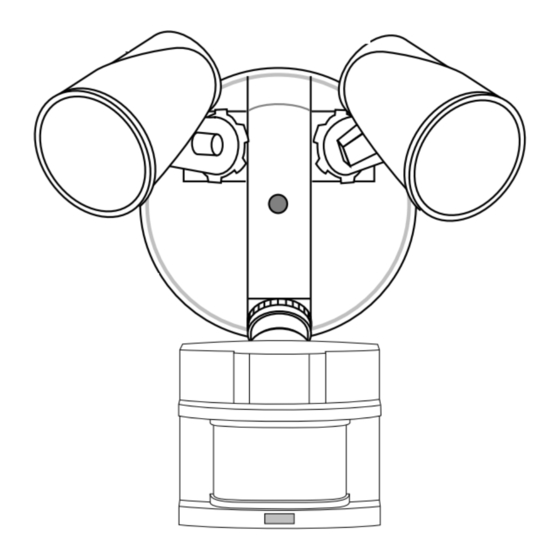
- When replacing sensors, match the mounting height and angle for consistent coverage.
A memorable mistake taught me to check photocells first. I replaced sensors twice before noticing the photocell was painted over during a previous homeowner’s paint job. Small checks first save big headaches.
PAA-style questions (People Also Ask)
What causes a motion light to stay on all night?
- A misset time delay, a failing photocell, or wiring that keeps power flowing can cause this. Check the timer and photocell first.
Why does my motion light not turn on at night?
- The photocell may think it is daylight or the bulb could be dead. Cover the photocell and test the light, and swap the bulb to check.
Can a motion sensor be too sensitive?
- Yes. High sensitivity causes false triggers from insects, cars, or small animals. Lower sensitivity or narrow the sensor angle.
How do I test a motion sensor without climbing a ladder?
- Use a mirror to view the photocell response or ask someone to walk the detection zone while you watch. A telescoping pole can also help.
Is it worth repairing an old motion detector light?
- If the wiring and housing are sound, replacing the sensor or photocell is often worth it. If the fixture is rusty or outdated, upgrading to an LED sensor fixture is smarter.
Frequently Asked Questions of Motion Detector Light Troubleshooting
Why is my motion detector light flickering?
Flicker often comes from a loose connection, incompatible bulb, or voltage fluctuation. Tighten connections and test with a compatible bulb.
My motion light turns on for cars but not people. Why?
Sensors detect heat and movement. Cars give a larger signature. Lower sensitivity or reposition the sensor to cover closer, human-sized targets.
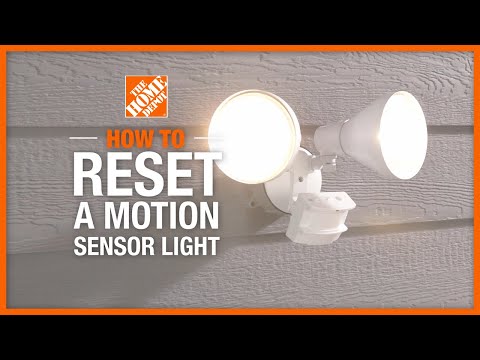
How do I reset a motion sensor light?
Switch power off at the breaker for 30 seconds, then restore power. Many sensors reset to defaults, clearing odd settings.
Can cold weather affect motion detectors?
Yes. Extreme cold can slow electronics and change sensitivity. Some sensors are rated for cold; check specs and consider a model designed for your climate.
What if the motion sensor only works during certain hours?
A failed photocell or misconfigured dusk-to-dawn setting is likely. Test the photocell by covering it and verify settings in the manual.
Conclusion
Motion Detector Light Troubleshooting is a practical skill that saves time and money. Start with simple checks: power, bulb, sensor settings, and wiring. Use safe practices and the right tools. If problems persist after these steps, replacing the sensor or fixture is often the best route. Take action now: perform a quick seasonal check, clean the lens, and note any recurring issues. If you found this guide helpful, try the troubleshooting steps today and share your results or questions below.

