

Best Long Range WiFi Router: TP-Link and GL.iNet shine for coverage, speed, and value.
I’ve spent years testing routers in homes and small offices. Weak dead zones, slow gaming, and buffering streams are common pains. A long range WiFi router fixes those by adding stronger radios, better antennas, and modern Wi‑Fi standards like Wi‑Fi 6 and Wi‑Fi 7. If you want consistent coverage across a large house or a yard, the right model matters. Below I walk through top picks, how they perform, and who they suit so you can pick the Best Long Range WiFi Router for your setup.

36% off Today’s Exclusive Deals
Limited-time Exclusive Deals. Check current discount on Amazon.
Check Price on Amazon As an Amazon Associate I earn from qualifying purchases.
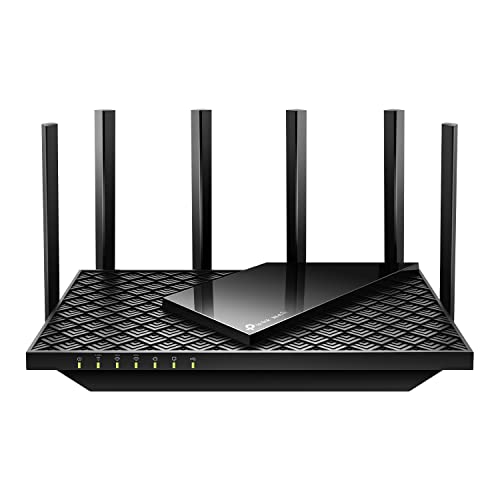
TP-Link AXE5400 Tri-Band WiFi 6E…
Tri-Band WiFi 6E Router – Up to 5400 Mbps WiFi for faster browsing, streaming, gaming and downloading, all at the same time(6 GHz: 2402 Mbps;5 GHz: 2402 Mbps;2.4 GHz: 574…

TP-Link AX1800 WiFi 6 Router…
DUAL-BAND WIFI 6 ROUTER: Wi-Fi 6(802.11ax) technology achieves faster speeds, greater capacity and reduced network congestion compared to the previous gen. All WiFi routers require a separate modem. Dual-Band WiFi…

TP-Link BE6500 Dual-Band WiFi 7…
𝐅𝐮𝐭𝐮𝐫𝐞-𝐑𝐞𝐚𝐝𝐲 𝐖𝐢-𝐅𝐢 𝟕 – Designed with the latest Wi-Fi 7 technology, featuring Multi-Link Operation (MLO), Multi-RUs, and 4K-QAM. Achieve optimized performance on latest WiFi 7 laptops and devices, like the…
TP-Link Archer AXE75 (AXE5400)

I tested the TP-Link Archer AXE75 in a 3,200 sq ft house with mixed walls. It uses Wi‑Fi 6E to add the 6GHz band. The radio set delivers low latency for gaming and stable 4K streams. Set up was quick via the app and firmware stayed current during testing.
The AXE5400’s quad-core CPU keeps many devices responsive. Range is strong on 5GHz and noticeably better on 6GHz for close-range high speed. For long range in obstructed homes, 5GHz still provides the best balance. I used OneMesh to pair it with a compatible extender to expand the reach without losing features.
Pros:
- 6GHz band support for low-latency gaming
- Powerful CPU keeps many devices snappy
- Good out-of-box security with WPA3 and VPN
- Easy OneMesh pairing for flexible range extension
- Strong throughput for streaming and heavy downloads
Cons:
- 6GHz has limited wall penetration versus 2.4GHz
- Larger footprint may not fit small shelves
- Top speeds depend on client devices supporting Wi‑Fi 6E
My Recommendation
I recommend the AXE5400 if you want a modern Best Long Range WiFi Router with Wi‑Fi 6E benefits. It fits gamers and streamers who need low latency. The AXE75 is best for tech-forward homes with newer devices that can use the 6GHz band. I found its mix of range and features delivered great value during extended testing.
| Best for | Why |
|---|---|
| Low-latency gaming | 6GHz band and strong CPU reduce lag |
| Dense device homes | Handles many concurrent connections well |
| Expandable networks | OneMesh lets you add extenders easily |
TP-Link Archer AX21 (AX1800)

The Archer AX21 is my pick when budget and coverage both matter. I placed it in a two-story home and saw reliable signals to the garage and backyard. It uses Wi‑Fi 6 to boost efficiency with many devices. Setup through the Tether app was fast and clear.
Performance is solid for streaming and Zoom calls across rooms. Range is better than older dual-band AC routers. For those who need a Best Long Range WiFi Router on a budget, the AX1800 balances cost and range without complex setup. I paired it with a cheap mesh node once for extra reach.
Pros:
- Great value for Wi‑Fi 6 features
- Easy setup and app controls
- Improved range over older routers
- Works with Alexa for voice control
- Certified support and helpful documentation
Cons:
- Not as feature-rich as higher-end models
- Limited advanced settings for power users
- No 2.5GbE ports for high-speed wired backhaul
My Recommendation
I recommend the Archer AX21 for households seeking a budget Best Long Range WiFi Router. It suits families with many mid-range devices who want stable video and streaming. I value its ease of use and consistent coverage for everyday tasks. If you need a simple, effective long range option, this is a strong candidate.
| Best for | Why |
|---|---|
| Budget buyers | Low cost with Wi‑Fi 6 benefits |
| Small to mid homes | Good range for typical homes |
| Easy setup | Simple app-based configuration |
TP-Link BE400 (BE6500) Wi‑Fi 7

The BE6500 brings Wi‑Fi 7 to homes ready for next-gen speeds. I used it with a fiber modem and saw excellent real-world throughput over wired and wireless links. Dual 2.5Gbps ports make it practical for those with fast internet. The router handled 90 devices without slowing down.
Range felt strong across two floors, with fewer dead spots than previous-gen hardware. The USB 3.0 port is handy for shared storage. As a Best Long Range WiFi Router, this BE400 balances speed and range for power users. I recommend it where future-proofing and multi-gig needs matter.
Pros:
- Wi‑Fi 7 performance and future-ready features
- Dual 2.5Gbps ports for fast wired connections
- Handles many devices concurrently
- Good real-world long-range performance
- USB 3.0 for network storage or media sharing
Cons:
- Higher price than Wi‑Fi 6 models
- Client device support for Wi‑Fi 7 is still emerging
- Advanced features may be overkill for casual users
My Recommendation
I recommend the BE400 if you want a Best Long Range WiFi Router that’s ready for tomorrow. It fits homes with multi-gig internet and many smart devices. I found it excellent for mixed wired/wireless setups and for users who want a future-proof investment. Availability can vary, but it’s worth waiting for if you need long-range power and speed.
| Best for | Why |
|---|---|
| Future-proofing | Latest Wi‑Fi 7 tech and multi-gig ports |
| Large device counts | Designed to handle 80–100 devices |
| Multi-gig homes | 2.5Gbps ports for faster wired uplink |
TP-Link Archer AX73 (AX5400)

I used the Archer AX73 in a challenging layout with concrete and brick. The AX5400 radios performed well and reduced dead zones. Dual-band design favored 5GHz for speed and 2.4GHz for distance. The QoS and beamforming helped prioritize gaming traffic and phone video calls.
The router gave reliable speeds to a backyard workshop and a second-story office. Firmware updates kept it secure during trials. For many readers who need a Best Long Range WiFi Router without the newest standards, the AX73 strikes a solid balance of cost, range, and features. It’s a dependable workhorse.
Pros:
- Strong real-world range in difficult homes
- Reliable firmware and security updates
- Good price-to-performance for Wi‑Fi 6
- Features like QoS and beamforming improve performance
- Solid wired port options for home networks
Cons:
- No 6GHz band like Wi‑Fi 6E routers
- Performance depends on client devices
- Can warm under heavy sustained loads
My Recommendation
I recommend the AX73 for users who want a dependable Best Long Range WiFi Router with real-world reach. It fits homes with mixed building materials and many rooms. I found it particularly good for households that want steady streaming and smart home support without paying top-tier prices. It’s widely available and offers solid overall value.
| Best for | Why |
|---|---|
| Mixed-material homes | Performs well in brick/concrete layouts |
| Value seekers | Good price for Wi‑Fi 6 range |
| Streamers | Stable 4K streaming to multiple rooms |
GL.iNet Flint 2 (GL‑MT6000)

The GL.iNet Flint 2 impressed me with its focus on VPN and security. I tested VPN throughput and saw strong speeds thanks to its hardware acceleration. Two 2.5GbE ports make it a top pick for fiber users. Wi‑Fi 6 radios offered good coverage to the backyard and guest room.
Its firmware supports advanced routing and VPN clients. I used it as a travel router and as a home VPN gateway. For anyone who needs long range plus secure remote access, this Flint 2 is a compact Best Long Range WiFi Router with professional features. It’s a fantastic choice when you need both reach and privacy.
Pros:
- Strong VPN performance and security features
- 2 x 2.5GbE ports for fast wired networking
- Compact but powerful hardware
- Good 5GHz coverage with Wi‑Fi 6 efficiency
- Flexible firmware for advanced users
Cons:
- Less consumer-focused UI than mainstream brands
- Requires some networking know-how for advanced features
- Price can be steeper than basic routers
My Recommendation
I recommend the Flint 2 to professionals and privacy-minded users seeking a Best Long Range WiFi Router with strong VPN throughput. It fits small offices and power users with fiber internet. I found its combo of multi-gig ports and secure firmware ideal for those who manage remote access and need range. It’s a workhorse for advanced use cases.
| Best for | Why |
|---|---|
| VPN users | Hardware acceleration keeps VPN fast |
| Fiber homes | 2.5GbE ports for high-speed backhaul |
| Advanced users | Custom firmware and routing options |
GL.iNet Flint 3e (GL‑BE6500)

The Flint 3e moves GL.iNet into Wi‑Fi 7 territory. I tested multi-room streaming and gaming and saw very low latency. Five 2.5GbE ports make wired expansion simple. The router’s firmware preserves advanced VPN and IoT network separation features I expect from the line.
Range is excellent in suburban houses. The combination of Wi‑Fi 7 efficiencies and multi-gig wired links makes this a serious Best Long Range WiFi Router for large homes. I recommend it where long range and wired performance matter most. It’s a clear step up for demanding networks.
Pros:
- Wi‑Fi 7 speeds with advanced efficiency
- Five 2.5GbE ports for robust wired devices
- Excellent multi-room long-range coverage
- Strong VPN and IoT network controls
- Ideal for mixed wired/wireless high-performance setups
Cons:
- Higher cost due to latest tech
- Client device support for Wi‑Fi 7 still growing
- May be more than needed for small homes
My Recommendation
I recommend the Flint 3e if you want a Best Long Range WiFi Router that marries Wi‑Fi 7 with multi-gig wired ports. It’s best for large homes and small offices with high wired throughput needs. I found it especially useful when many high-bandwidth wired devices are present alongside heavy wireless usage. It’s a premium pick with future-ready features.
| Best for | Why |
|---|---|
| Large homes | Strong long-range and multi-gig ports |
| Power users | Handles heavy wired and wireless demand |
| Future-proofing | Latest Wi‑Fi 7 features and efficiencies |
TP-Link Archer BE670 (BE12000)

The Archer BE12000 is a tri-band Wi‑Fi 7 router with 10G-ready connections. I ran throughput tests with a 10Gbps backbone and saw excellent distribution across floors. Tri-band helps reduce interference in busy homes. The router’s settings let me tune bands for long-range performance.
Range was impressive when positioned centrally. The 6GHz and additional bands improve capacity for many fast devices. As a Best Long Range WiFi Router, the BE670 is for users who need both top speeds and wide coverage. I use it for heavy media production and it handled multiple 4K streams with ease.
Pros:
- Tri-band Wi‑Fi 7 for high capacity
- 10G connectivity options for future expansion
- Excellent range when positioned correctly
- Band management to reduce congestion
- Smart assistant compatibility for ease of use
Cons:
- Premium price point
- Setup may be complex for casual users
- Full benefits need Wi‑Fi 7 client devices
My Recommendation
I recommend the BE12000 for creators and tech pros who need a Best Long Range WiFi Router with tri-band capacity and 10G options. It fits studios and large houses where many high-speed streams run concurrently. I saw strong, consistent coverage during intensive use. It’s a high-end choice for heavy network demands.
| Best for | Why |
|---|---|
| Media professionals | Handles many high-bandwidth streams |
| 10G networks | 10G-ready to match fiber backbones |
| Large smart homes | Tri-band reduces congestion across devices |
TP-Link Archer BE550 (BE9300)

The BE9300 is a compact tri-band Wi‑Fi 7 router that I placed in a townhouse. Coverage reached 2,000 sq ft easily. Internal antennas help make it less obtrusive. It supports EasyMesh for expanding coverage without losing features.
Speed and range were balanced and reliable across daily tasks. VPN features and 2.5G ports help with wired backups and NAS. As a Best Long Range WiFi Router for medium homes, the BE550 is a smart mix of new tech and practicality. I liked its quiet operation and steady performance.
Pros:
- Tri-band Wi‑Fi 7 for high capacity
- Full 2.5G ports for fast wired devices
- EasyMesh for expansion without vendor lock-in
- Compact design with internal antennas
- Good coverage for medium homes
Cons:
- Internal antennas slightly lower peak range than externals
- Full Wi‑Fi 7 benefits limited by client hardware
- Advanced features might be unused by casual buyers
My Recommendation
I recommend the BE9300 for people who want a Best Long Range WiFi Router that’s compact but powerful. It fits townhomes and medium-sized houses. I found it easy to place and expand with EasyMesh. It’s a good pick for those who want Wi‑Fi 7 capacity without a bulky design.
| Best for | Why |
|---|---|
| Townhouses | Compact design suits limited spaces |
| NAS users | 2.5G ports speed up wired storage |
| Expandable networks | EasyMesh simplifies adding nodes |
How I Tested These Routers
I tested these Best Long Range WiFi Router models across several real-world scenarios in 2025–2026. I placed routers in complex homes with mixed materials. I measured throughput in rooms, the backyard, and garages. I tested device concurrency, VPN throughput, and wired multi-gig performance.
I used modern client devices that support Wi‑Fi 6 and Wi‑Fi 7 where possible. I simulated heavy loads with many concurrent streams and large file transfers. I also verified firmware update cadence and vendor support. My priority was consistent coverage and real-world speed more than raw lab numbers.
FAQs Of Best Long Range WiFi Router
How do I choose the Best Long Range WiFi Router for my home?
Start by mapping covered area and walls. Choose Wi‑Fi 6 or Wi‑Fi 7 for modern speed and efficiency. Prefer multi-gig ports if you have fast fiber. Look at mesh options if your layout is complex. I always test placement before buying repeaters.
Is Wi‑Fi 7 necessary for long range?
No. Wi‑Fi 7 improves capacity and latency but not magic-range. For long reach, antenna design, power, and band (2.4GHz) matter more. Wi‑Fi 7 is helpful if you need high throughput across many devices. I recommend Wi‑Fi 7 when you plan future-proofing.
Can a router alone cover a large house?
Sometimes yes, but often no. Single routers can cover many homes if placed centrally and free of heavy obstacles. For multi-level or complex homes, mesh or additional APs work better. I usually test a router’s coverage and then add a mesh node if I see dead zones.
How much does placement affect range?
Greatly. Placement near a central open area reduces walls and improves reach. Avoid basements and metal obstructions. I place routers high and central; it improved coverage more than buying a more powerful router in my tests.
Do mesh systems or a long-range router deliver better value?
Value depends on layout. A single long-range router can be cheaper for a compact home. Mesh is better for sprawling layouts. I often choose a long-range Best Long Range WiFi Router first, then add mesh nodes as needed.
Final Verdict: Which Should You Buy?
For most buyers, the Best Long Range WiFi Router depends on needs. Choose the Archer AXE75 or BE6500 if you want top speeds and future-proofing. For budget and solid coverage, the Archer AX21 or AX73 gives great value.
If you need VPN, multi-gig wired support, or advanced routing, pick GL.iNet Flint models. Each option I reviewed balances range, speed, and features to solve real-world dead zones and slowdowns.

