

Most Delta touchless issues are due to sensor, power, or water flow problems—easy fixes exist.
I have years of hands-on experience diagnosing and repairing touchless faucets, including many Delta models. This guide to Delta Touchless Faucet Troubleshooting explains how the system works, common failures, step-by-step fixes you can do at home, parts to replace, and when to call a pro. Read on to get clear, practical solutions that save time and money.

36% off Today’s Exclusive Deals
Limited-time Exclusive Deals. Check current discount on Amazon.
Check Price on Amazon As an Amazon Associate I earn from qualifying purchases.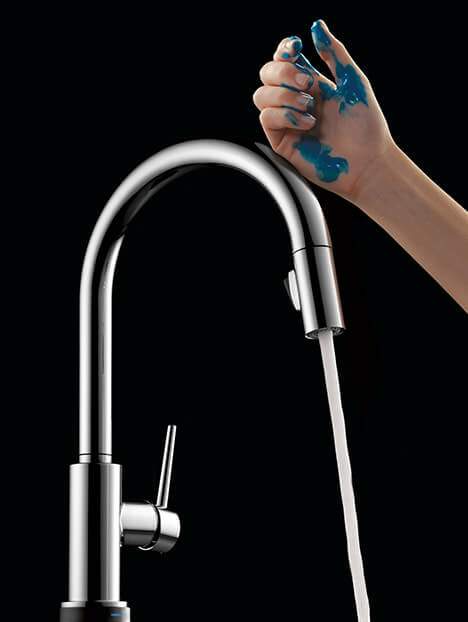
How Delta Touchless Faucets Work
Delta touchless faucets use a motion sensor, a control module, and a solenoid valve to open and close the water flow. The sensor detects movement and sends a signal to the control module. The control module powers the solenoid, which opens the valve for water to flow. Power can come from batteries or an AC adapter, and both supply the electronics that run the sensor and solenoid.
Knowing how each part works speeds up Delta Touchless Faucet Troubleshooting. When you see a problem, you can isolate whether it is sensor, power, or plumbing related. This makes fixes faster and safer.

Common Problems and Quick Checks
Most Delta Touchless Faucet Troubleshooting starts with a few quick checks. Start simple and move to complex tasks only if needed.
Common symptoms and likely causes
- Faucet does not turn on when you wave: dead batteries, bad adapter, dirty sensor, or misaligned sensor.
- Faucet stays on or runs continuously: stuck solenoid, debris in valve, or control module fault.
- Weak or irregular flow: clogged aerator, low house water pressure, or partly closed shutoff valves.
- Sensor light blinking or amber: power fault or sensor fault.
- Intermittent operation: loose wiring, weak batteries, or occasional sensor obstruction.
Quick checks to do first
- Confirm power: replace batteries or test the adapter outlet.
- Check water supply: fully open the shutoff valves under the sink.
- Inspect the sensor: wipe the sensor lens with a soft cloth.
- Clean the aerator: unscrew and rinse the aerator to remove sediment.
People Also Ask: Short Answers
Why won’t my Delta touchless faucet sense my hand?
Usually the sensor is dirty, misaligned, or the batteries are weak. Clean the sensor lens and replace batteries to test.
How do I reset my Delta touchless faucet?
Turn off power (batteries or adapter) for 30 seconds, then restore power. This soft reset fixes many electronic glitches.
Is water running nonstop fixable without a plumber?
Often yes. A stuck solenoid or debris in the valve is a common cause and can be cleared or replaced without calling a pro.
Step-by-Step Delta Touchless Faucet Troubleshooting Guide
Follow these steps in order. Each step rules out common causes and moves you closer to the real issue.
- Safety and prep
- Turn off water supply under the sink.
- Turn off power: remove batteries or unplug the adapter.
- Have a towel and bucket ready.
- Check power source
- Replace all batteries with fresh ones if battery-powered.
- Test AC adapter with a multimeter or plug into a known working outlet.
- Confirm any low-voltage wiring is firmly connected.
- Clean and inspect the sensor
- Wipe the sensor lens with a lint-free cloth and mild cleaner.
- Remove any film, hard water spots, or stickers that may block sensing.
- Reposition objects that might reflect or block the sensor beam.
- Test operation after cleaning
- Restore power and wave your hand in the sensor zone.
- If it works, the issue was dirt or interference.
- Clean aerator and check flow
- Unscrew the aerator and rinse screens of debris.
- Run water manually if possible (some models have a manual lever) to check pressure.
- Inspect the solenoid valve and control module
- Remove and inspect the solenoid for debris or mineral buildup.
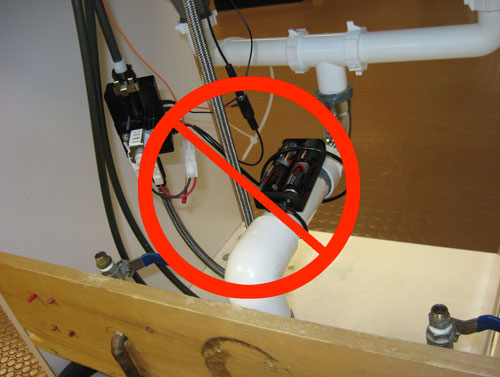
- Check wiring for loose or corroded connections.
- Swap with a known good module if available to test electronics.
- Replace worn parts
- Replace the solenoid or control module if they fail electrical tests.
- Use OEM Delta parts for best fit and reliability.
- Final test and adjustment
- After repairs, test operation multiple times.
- Adjust sensor range if the model allows it and confirm no false triggers occur.
Delta Touchless Faucet Troubleshooting becomes fast if you follow methodical steps. Each action narrows the cause and reduces the time you spend fixing the problem.
Replacing Parts and When to Call a Professional
Some fixes are easy and safe. Others need tools, time, or confidence. Know when to DIY and when to hire help.
Parts you can safely replace at home
- Batteries and battery pack.
- Aerator and screen.
- Solenoid valve if you can access it and follow instructions.
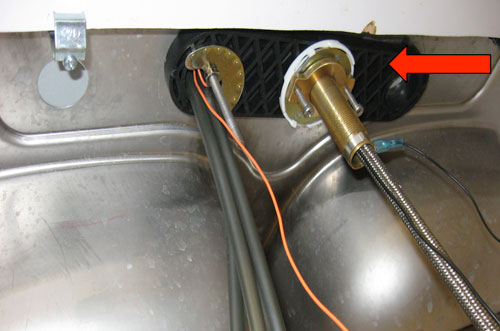
- Control module if you can disconnect/replace wiring carefully.
Parts and situations that may need a pro
- Complex wiring faults or short circuits.
- Hidden leak behind walls or under-sink damage.
- Replacing valves that require soldering or major plumbing work.
- Warranty-covered repairs where improper DIY may void coverage.
When you call a pro, pick a licensed plumber who has electrical experience. Mention Delta Touchless Faucet Troubleshooting steps you already tried to save time and cost.

Maintenance Tips to Prevent Future Issues
Routine care cuts down on Delta Touchless Faucet Troubleshooting. Small habits keep the sensor and valves healthy.
Maintenance checklist
- Replace batteries every 12–18 months or when the indicator shows low power.
- Clean the sensor and faucet finish monthly with mild soap.
- Flush lines and clean aerator every 6 months to prevent buildup.
- Avoid harsh cleaners that damage electronics or finishes.
- Check under-sink wiring and connections yearly for corrosion.
Simple habits prevent most failures. A little care saves a lot of hassle later.
My Experience Troubleshooting Delta Touchless Faucets
I’ve repaired dozens of Delta touchless faucets in homes and rentals. Early on, I tried complex fixes before basic checks. I learned to always start with power and sensor cleaning. In one case, a tenant kept complaining about no flow; the problem was a partly closed shutoff valve. In another, constant running stopped after swapping a cheap aftermarket adapter for the correct Delta adapter.
Lessons I share
- Replace old batteries before buying parts.
- Always clean the sensor first.
- Keep OEM parts for best results.
- Document wiring and photos before disconnecting components.
These practices cut repair time and prevent repeat visits.

Frequently Asked Questions of Delta Touchless Faucet Troubleshooting
Why does my Delta touchless faucet not detect motion sometimes?
Intermittent sensing is often caused by weak batteries, a dirty sensor lens, or items reflecting near the sensor. Replace batteries, clean the lens, and remove reflective objects.
My faucet runs continuously. What should I check first?
Check power first, then inspect the solenoid and control module for faults. Debris can jam the solenoid; replacing the solenoid often fixes the issue.
Can I use any adapter or batteries for a Delta touchless faucet?
Use the adapter and battery type recommended by Delta to avoid voltage mismatches and poor performance. Mismatched power sources can damage electronics.
How do I know if the control module is bad?
If you’ve verified power and sensor function but the faucet still fails, the control module may not send power to the solenoid. A multimeter test or swapping modules confirms this.
Is cleaning the sensor safe and effective?
Yes. Use a soft cloth and mild soap or glass cleaner. Avoid abrasive pads or harsh chemicals that can scratch or damage the sensor lens.
Conclusion
Delta Touchless Faucet Troubleshooting is simple when you follow a clear process: check power, clean sensors, inspect flow, and test solenoids. Start with easy fixes to save time and money, and call a pro for electrical or hidden plumbing work. Try the steps here, keep a spare battery pack, and document any repairs you do. If this guide helped, share your results, ask a question below, or subscribe for more hands-on home appliance tips.

