

Most Dish Network remote issues fix with battery changes or a quick reboot of the receiver.
I’ve spent years fixing set-top boxes and remotes, so I know Dish Network Remote Control Troubleshooting inside out. This guide walks you through clear steps, real-world tips, and mistakes to avoid when your Dish remote misbehaves. Read on for simple fixes, pairing help, advanced resets, and buying advice that you can use right now.

36% off Today’s Exclusive Deals
Limited-time Exclusive Deals. Check current discount on Amazon.
Check Price on Amazon As an Amazon Associate I earn from qualifying purchases.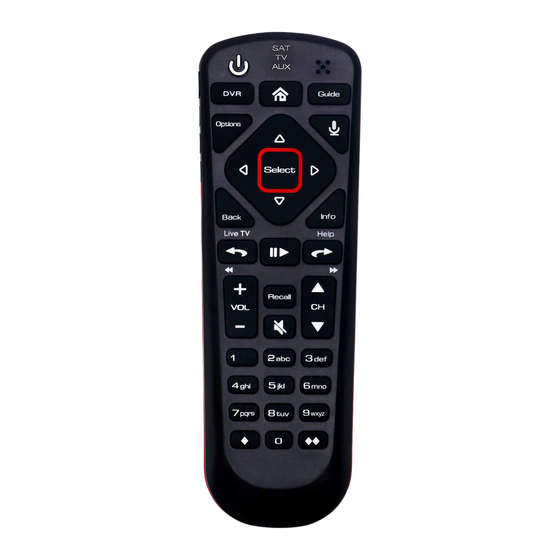
Why Dish Network Remote Control Troubleshooting matters
A remote controls your TV and your mood. When it fails, you lose access to shows and key features. Dish Network Remote Control Troubleshooting helps you find the root cause fast. It saves time and avoids needless purchases by fixing common faults first.
Common causes of Dish Network Remote Control Troubleshooting issues
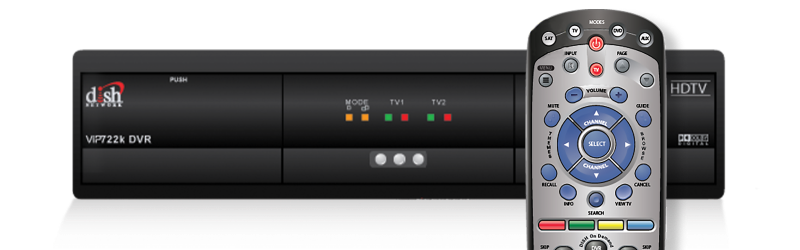
Most remote problems come from simple sources. Batteries die or sit poorly in their slots. Dirt and wear block the signal or buttons. Software updates or a receiver fault can stop pairing. Physical damage or incompatible replacement remotes also cause trouble.
Basic Dish Network Remote Control Troubleshooting steps
Follow these steps first. They fix the majority of problems quickly and safely.
- Replace the batteries with fresh alkaline or lithium cells. Weak cells can seem fine but fail under load.
- Re-seat the batteries. Take them out, clean the contacts with a dry cloth, then reinstall.
- Power cycle the Dish receiver. Unplug the receiver for 30 seconds, then plug it back in. Wait one minute before testing the remote.
- Check line of sight and range. Point the remote directly at the receiver or avoid blocking objects.
- Test with another remote or the Dish app. If a phone app works, the issue is the remote.
Pairing and programming: reconnecting your remote
Pairing or programming is often needed after a reset or firmware change. The exact steps vary by remote model, but the concept stays the same.
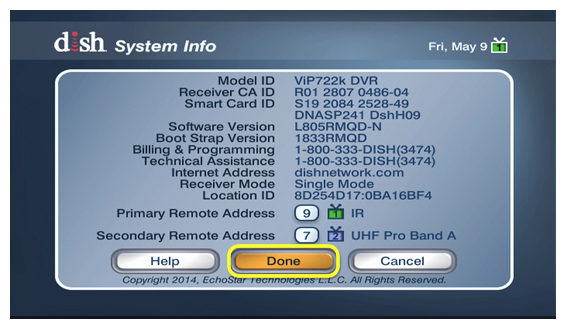
- Put the receiver in pairing mode. Use the on-screen menu under Settings or Remote Control.
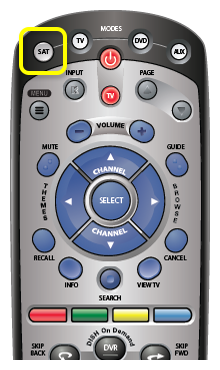
- Press the remote’s pairing or setup button as instructed. Hold it until a light blinks.
- Follow the on-screen prompts to complete pairing. Confirm the remote controls guide and volume.
- For TV control, program the remote with the TV code. Use the receiver’s setup menu to enter the code or run auto-search.
If pairing fails, restart both devices and try again. If you can’t access menus, use the Dish mobile app to confirm receiver status.
Advanced Dish Network Remote Control Troubleshooting fixes
When basics fail, try deeper steps. These are safe but may be a bit technical.
- Perform a factory reset of the remote. Look for a small setup sequence in the manual or system menu to restore defaults.
- Clean the remote internals. Remove the battery cover and gently clean button contacts with isopropyl alcohol on a cotton swab.
- Check IR versus RF. Some remotes use infrared and need direct sight. Others use RF and require pairing with the receiver.
- Reflash or update the receiver firmware. Let the receiver fully update and reboot; this can restore remote function.
- Test for hardware faults. If one or more buttons fail, the remote may have worn rubber contacts or a cracked circuit.
I once fixed a remote by bending a stuck contact gently back into place. Small fixes like that save money. But if the circuit board is cracked, replacement is the safest route.

When to replace your Dish remote
Some issues mean repair is no longer worth it. Replace your remote if you see these signs.
- Multiple buttons don’t work despite cleaning and resets.
- The case is cracked and circuitry is exposed.
- The remote loses pairing and can’t re-pair after updates.
- You need newer features like voice control that your old remote lacks.
Replacement remotes are widely available and often low cost. Buy a model that lists compatibility with your receiver. Check return policies and warranty when you buy.
Preventive tips for long remote life
Small habits prevent most remote problems. Use these tips to avoid future Dish Network Remote Control Troubleshooting headaches.
- Use quality batteries and replace them regularly.
- Keep the remote away from heat and moisture.
- Clean the remote monthly with a dry cloth and compressed air.
- Use a protective sleeve if you have pets or small kids.
- Keep receiver firmware updated to keep pairing stable.
These habits reduce failures and extend remote lifespan. I keep a small battery kit near the TV. It saves a frantic search when the remote dies during a show.
Quick questions users ask (PAA-style)
How do I reset my Dish remote?
Reset the remote by removing batteries, pressing every button once, then reinstalling fresh batteries. If your model has a factory reset sequence, follow the receiver’s on-screen instructions.
Why won’t my Dish remote control the TV volume?
The remote may not be programmed for your TV. Run the TV code setup in the receiver menu or use auto-search to find the correct code.
Can a Dish remote be synced to multiple receivers?
Most entries let one primary pairing per remote, but some remotes can be programmed for multi-unit setups. Check your model’s manual for exact limits.
Frequently Asked Questions of Dish Network Remote Control Troubleshooting
How do I pair my Dish remote to the Hopper?
Put the Hopper in pairing mode via Settings, then press and hold the remote’s pairing button until the light blinks. Follow the on-screen prompts to finish pairing.
Why does my Dish remote work sometimes and not always?
Intermittent operation is often due to weak batteries, loose battery contacts, or interference. Try fresh batteries and clean contacts first.
What type of batteries work best in Dish remotes?
Alkaline batteries are fine for most users; lithium cells last longer and handle cold better. Avoid mixing old and new cells.
My remote buttons are sticky. How can I fix them?
Remove the batteries and clean the button areas with a soft cloth and a small amount of isopropyl alcohol. For stubborn dirt, open the case if you’re comfortable and clean the silicone pads gently.
Can I use a universal remote with my Dish receiver?
Yes, many universal remotes support Dish receivers. Use the receiver’s setup menu to program the remote with the correct code or pairing method.
What if the remote light blinks but nothing happens?
A blinking light can mean the remote is sending a signal but the receiver won’t accept it. Try re-pairing, rebooting the receiver, or testing line of sight.
How long should a Dish remote last?
With normal use and care, a remote can last several years. Battery life depends on use; replacing batteries yearly is a good rule of thumb.
Conclusion
You can fix most issues quickly with clear Dish Network Remote Control Troubleshooting steps. Start with batteries, cleaning, and a receiver reboot, then move to pairing and resets if needed. If hardware is damaged or you need new features, replace the remote with a compatible model. Try the steps here, and leave a comment if you want model-specific help or step-by-step pairing instructions for your unit.

