

ChatGPT has become a household name in the world of artificial intelligence. People are using it for everything from writing emails to learning new languages, coding help, and brainstorming ideas. But what is ChatGPT, and how do you use it to its fullest potential?
This guide will break down everything you need to know, even if you’re just getting started.

36% off Today’s Exclusive Deals
Limited-time Exclusive Deals. Check current discount on Amazon.
Check Price on Amazon As an Amazon Associate I earn from qualifying purchases.What Is Chatgpt?
ChatGPT is an AI chatbot created by OpenAI. It uses advanced technology called natural language processing (NLP) to understand what you type and reply in a human-like way. You can ask ChatGPT questions, get explanations, or even have a conversation about almost any topic.
ChatGPT is powered by a model called GPT-3.5 or GPT-4, depending on the version you access. These models have been trained on massive amounts of text from the internet, so they know a lot about many subjects. However, ChatGPT does not “think” or “know” like a human—it finds patterns in data to create useful responses.
Key Features
- Text-based conversations
- Multi-language support
- Can remember context within a session
- Available on web, mobile, and API
Many people use ChatGPT for work, study, or just for fun. But to really make the most of it, you need to know how to interact with it the right way.
Getting Started With Chatgpt
Before you use ChatGPT, you need to know where to access it. There are a few main ways:
- OpenAI’s official website (chat.openai.com)
- Mobile apps for iOS and Android
- Third-party integrations (for example, inside Microsoft Word or Slack)
- API access (for developers)
Most people start with the OpenAI website. Signing up is simple—just an email address and password. Some versions are free, but for the latest features, you may need a paid subscription.
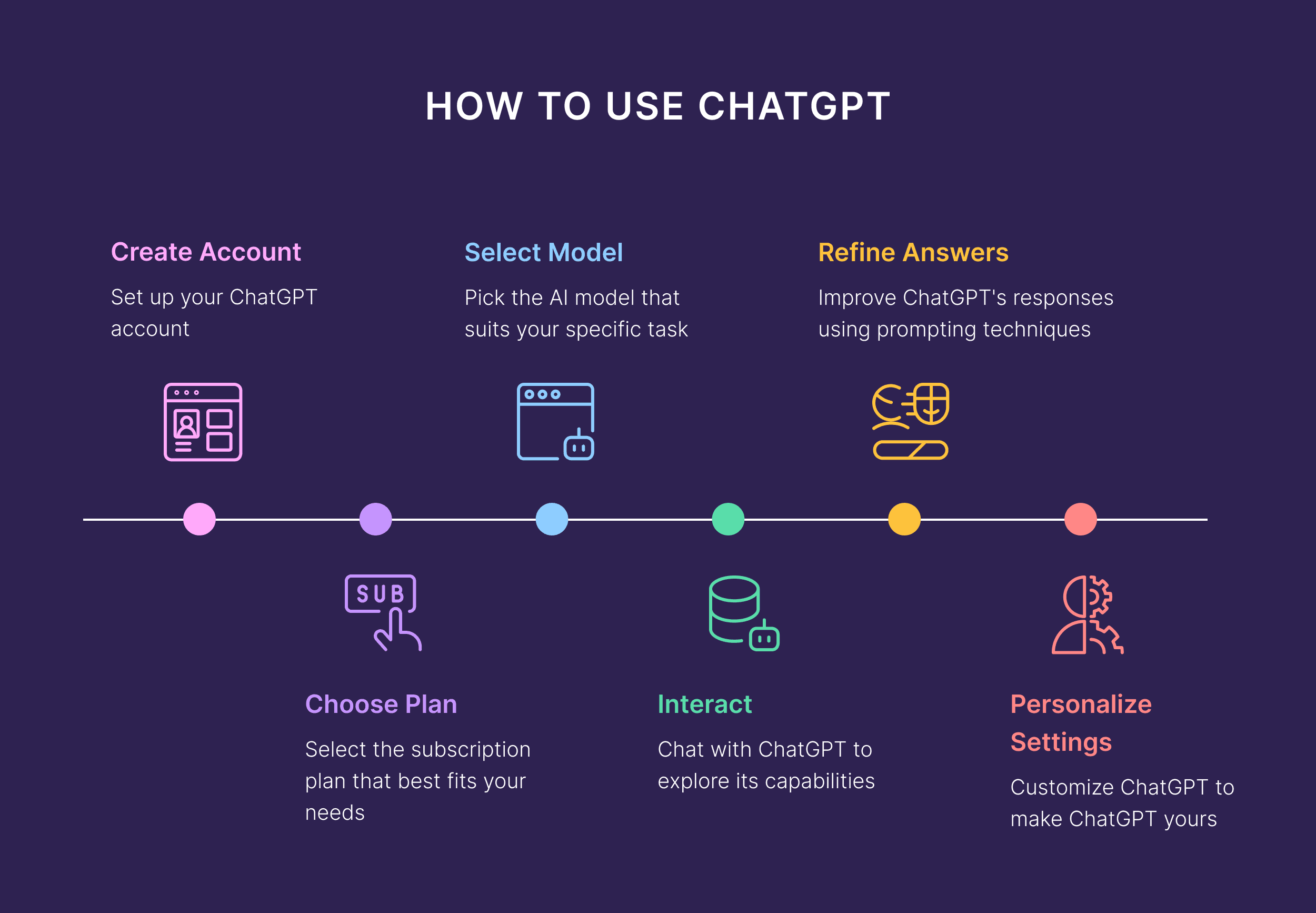
How To Sign Up
- Visit chat.openai.com
- Click Sign Up
- Enter your email and create a password
- Verify your email address
- Log in and start chatting
Tip: Use a strong password and enable two-factor authentication for better security.
How To Start A Conversation
Once you’re logged in, you’ll see a chat window. Here’s how to start:
- Type a question or request in the text box. Example: “Explain quantum physics in simple terms.”
- Press Enter or click the send button.
- Wait for ChatGPT to reply.
You can continue the conversation by typing more questions or comments. ChatGPT will remember the context within the current session.
What Can You Ask Chatgpt?
You can ask about almost anything, such as:
- Definitions: “What is blockchain?”
- Summaries: “Summarize the plot of Romeo and Juliet.”
- Advice: “How can I improve my English writing?”
- Creative writing: “Write a funny story about a robot and a cat.”
- Translation: “Translate ‘good morning’ into Spanish.”
- Coding help: “Write a Python function to reverse a string.”
Non-obvious insight: ChatGPT can help you brainstorm ideas or plan projects, not just answer questions. For example, you can ask for content outlines or business names.
Making Your Prompts Effective
The way you ask ChatGPT is important. A prompt is what you type to get a reply. Clear, specific prompts often get better results.
How To Write Good Prompts
- Be clear about your goal: “Write a 100-word summary about climate change.”
- Give context: “I’m a college student. Explain machine learning basics.”
- Ask for examples: “Show me three examples of formal email greetings.”
- Use step-by-step instructions: “List steps to bake a chocolate cake.”
Below is a quick comparison of vague vs. specific prompts:
| Vague Prompt | Specific Prompt |
|---|---|
| Tell me about photosynthesis. | Explain photosynthesis in simple terms for a 10-year-old. |
| Write an email. | Write a formal email to my manager asking for a day off. |
| Help with math problem. | Show step-by-step solution for 2x + 3 = 7. |
Non-obvious insight: ChatGPT can follow instructions for formatting. For example, you can ask for bullet points, numbered lists, or even tables in the reply.
Understanding Chatgpt’s Strengths And Limits
ChatGPT is powerful but not perfect. Knowing what it does well—and where it struggles—will help you use it wisely.
Strengths
- Quick answers on many topics
- Creative writing and brainstorming
- Language translation and practice
- Summarizing long texts
- Coding help and debugging
Limits
- Can make mistakes or give outdated info
- Doesn’t know anything after its last update (often up to 2023 or 2024)
- Can’t access or browse the live internet (unless you use special features)
- Sometimes gives answers that sound confident but are wrong (this is called a “hallucination”)
- May not understand highly technical or new topics perfectly
Below is a summary table of strengths and limits:
| Strengths | Limits |
|---|---|
| Fast, human-like replies | Can make factual errors |
| Understands many languages | Does not have opinions or feelings |
| Creative and flexible | Cannot access real-time information |
| Great for summaries and explanations | May repeat information |
Tip: Always double-check critical answers, especially for health, legal, or financial topics.
Everyday Uses For Chatgpt
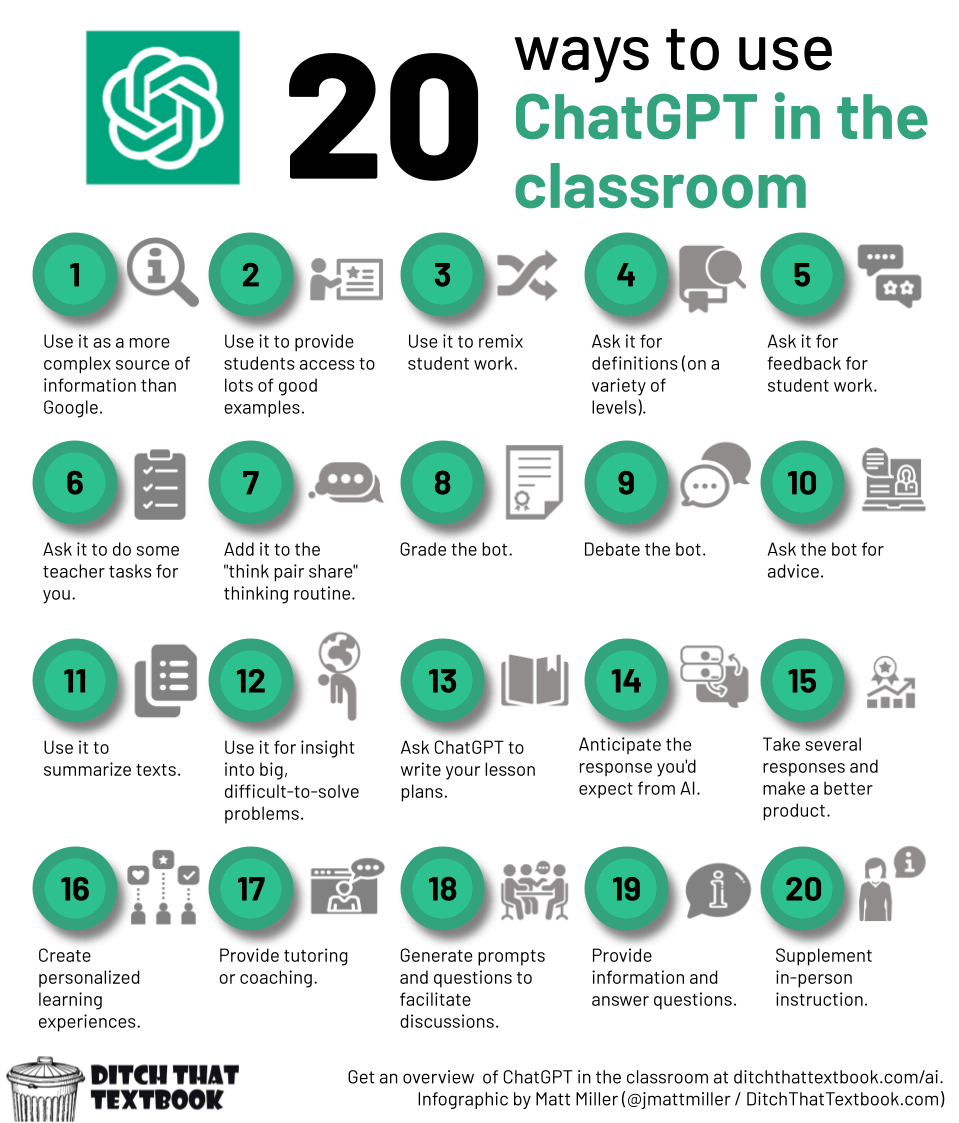
ChatGPT can help you in many areas of daily life and work. Here are some popular uses:
1. Writing And Editing
- Draft emails and letters
- Check grammar and spelling
- Rewrite text to make it clearer
Example: “Can you rewrite this paragraph to sound more professional?”
2. Learning And Homework
- Get explanations for difficult topics
- Practice languages
- Solve math problems step by step
Example: “Explain the water cycle in simple words.”
3. Brainstorming Ideas
- Generate business names
- Suggest blog topics
- Plan travel itineraries
Example: “Give me 5 blog ideas about healthy eating.”
4. Coding Help
- Write sample code in Python, JavaScript, etc.
- Debug errors in your code
- Explain programming concepts
Example: “What does ‘for loop’ mean in Python?”
5. Translation And Language Practice
- Translate text between languages
- Practice conversations in English, Spanish, etc.
- Learn new vocabulary
Example: “How do you say ‘good luck’ in French?”
6. Entertainment And Fun
- Tell jokes or riddles
- Write creative stories or poems
- Play text-based games
Example: “Tell me a funny story about a talking dog.”
Non-obvious insight: ChatGPT can simulate interviews or role-play scenarios. For example, you can practice a job interview or negotiate a deal.
Advanced Features And Settings
If you want to do more with ChatGPT, explore its advanced options.
Custom Instructions
Some versions let you set custom instructions. This means you can tell ChatGPT about your preferences, background, or goals, and it will try to remember them during your session.
Example: “I am a high school teacher. Please use simple language and focus on education topics.”
Using Chatgpt With Plugins Or Browsing
If you subscribe to ChatGPT Plus or use certain platforms, you might get extra features:
- Web browsing: ChatGPT can look up fresh information online
- Plugins: Connect to other apps and services, like booking flights or analyzing data
Tip: These features often require enabling in the settings. Not all users have access, and some features are only available in English or specific regions.
Using Chatgpt Api
For developers, ChatGPT offers an API. This lets you connect the chatbot to your own apps, websites, or tools.
How The Api Works
- You send a text prompt to the API endpoint
- The API returns the chatbot’s reply
- You can use this reply in your app or service
Example use cases:
- Customer support chatbots
- Virtual teaching assistants
- Automated content creation
Note: The API is not free. You pay based on how much you use it. Full details and pricing are on the OpenAI documentation.
Tips For Getting The Best Results
Even experienced users sometimes miss ways to get more from ChatGPT. Here are some practical tips:
1. Use Follow-up Questions
If the first answer isn’t perfect, ask a follow-up. For example: “Can you explain that with an example?” or “What are the pros and cons?”
2. Ask For Rewriting Or Summarizing
You can ask ChatGPT to summarize long texts or rewrite information in a different style or reading level.
Example: “Summarize this article in 5 bullet points.”
3. Request Multiple Options
If you want choices, ask for a list. For example: “Give me 3 possible titles for my essay.”
4. Specify Output Format
You can request answers as tables, lists, or other formats.
Example: “Show the data in a table with columns for year and population.”
5. Set Character Or Word Limits
If you need a short answer, you can say, “Explain in 50 words or less. ”
6. Use The Reset Feature
If the chatbot gets off track, use the reset button or start a new session. This clears the context and can improve replies.
7. Share Feedback
Most versions let you thumbs up/down answers. Giving feedback helps improve the service.
Non-obvious insight: ChatGPT can simulate different tones. For example, “Write this in a friendly, casual style” or “Make this more formal.”
Privacy And Safety With Chatgpt
When you use ChatGPT, your conversations may be stored by OpenAI to improve the service. Here’s what you need to know:
- Do not share personal details (address, phone number, passwords)
- For sensitive topics, check the privacy policy
- You can delete your account or data from your settings
Tip: For business or confidential use, check if your organization has special agreements with OpenAI.

Common Mistakes And How To Avoid Them
Many users make similar errors when starting with ChatGPT. Avoid these to get better results.
1. Too Vague Prompts
If you ask, “Tell me about history,” you’ll get a very general answer. Be specific: “Give a short summary of World War II.”
2. Expecting Real-time Updates
ChatGPT does not know the latest news or events unless you use a browsing feature.
3. Copying Answers Without Checking
ChatGPT can make mistakes. Always double-check important information, especially for studies or work.
4. Sharing Sensitive Information
Never put private data in the chat.
5. Not Using Advanced Features
Many people stick to basic questions. Try out lists, tables, summaries, and role-plays for more value.
Comparing Free And Paid Chatgpt Versions
There are both free and paid versions of ChatGPT. Here’s a quick comparison:
| Feature | Free Version | Paid Version (Plus) |
|---|---|---|
| Model | GPT-3.5 | GPT-4 (latest) |
| Speed | Good | Faster, priority access |
| Advanced features (browsing, plugins) | No | Yes |
| Conversation history | Limited | More, with extra features |
| Cost | Free | Monthly fee (about $20/month) |
Tip: For most basic tasks, the free version is enough. If you need better performance, consider upgrading.
Accessibility And Language Support
ChatGPT supports many languages and is accessible in most countries. Here’s what you should know:
- You can chat in English, Spanish, French, Chinese, and more
- The quality of answers may be higher in English
- Voice input and output are available in some apps
- ChatGPT works on computers, tablets, and phones
If you have disabilities, ChatGPT can be used with screen readers and other accessibility tools.
Responsible Use Of Chatgpt
AI chatbots are powerful, but they should be used responsibly:
- Do not use ChatGPT to create spam or false information
- Do not rely on ChatGPT for medical or legal decisions
- Always mention when content is AI-generated if required
Non-obvious insight: If you use AI-generated content in public (like blogs or social media), some platforms require you to disclose that it was created with help from AI.
How Chatgpt Is Changing Work And Learning
AI tools like ChatGPT are changing how people learn and work. Students use it to understand hard subjects. Professionals use it to save time on routine tasks. Companies use it to help customers or create content faster.
Data point: In a 2023 survey, more than 30% of US office workers reported using AI tools like ChatGPT at least once a week.
However, the best results come when you use ChatGPT as a partner—not a replacement for your own thinking. Always combine AI suggestions with your own knowledge and creativity.
Frequently Asked Questions
What Is The Difference Between Chatgpt-3.5 And Chatgpt-4?
ChatGPT-4 is a newer, more advanced version. It can understand and reply with more accuracy, handle longer conversations, and is better at complex tasks. The free version usually uses GPT-3. 5, while ChatGPT-4 is available with a paid subscription.
Can Chatgpt Access Live Internet Or Real-time News?
No, ChatGPT cannot access the live internet or real-time news, unless you use special features like web browsing in the paid version. Normally, its knowledge stops at the last update date.
Is It Safe To Use Chatgpt For Personal Information?
You should not share sensitive or private information with ChatGPT. Conversations may be stored for training and quality purposes. For privacy details, always check OpenAI’s privacy policy.
Can I Use Chatgpt In Languages Other Than English?
Yes, ChatGPT supports many languages. English is the most accurate, but it works with Spanish, French, Chinese, and more. Some features may be limited in other languages.
How Much Does Chatgpt Plus Cost, And Is It Worth It?
ChatGPT Plus costs about $20 per month. It gives you access to GPT-4, faster replies, and advanced features like browsing and plugins. If you use ChatGPT often for work or study, the upgrade may be worth it.
ChatGPT is a powerful tool for learning, working, and creativity. With the right approach, it can save you time and help you do more. Use it wisely, keep learning, and you’ll discover new ways to make AI your partner every day.

