

Fast fixes for Samsung Electric Range Troubleshooting: check power, fuses, elements, and error codes.
I’ve spent years fixing kitchen appliances and helping homeowners with Samsung Electric Range Troubleshooting. This guide breaks down common faults, clear step-by-step checks, error code meanings, and safe fixes you can try at home. Read on to learn how to diagnose issues, avoid costly mistakes, and know when to call a pro.

36% off Today’s Exclusive Deals
Limited-time Exclusive Deals. Check current discount on Amazon.
Check Price on Amazon As an Amazon Associate I earn from qualifying purchases.
Common Samsung Electric Range Problems
Electric ranges share similar faults. Samsung Electric Range Troubleshooting often starts with power and safety checks. The most common problems I see are:
- Oven not heating
- Bake or broil element may be faulty or the sensor could be bad.
- Stovetop burners not working
- Coil elements, connections, or the burner switch can fail.
- Control panel or display errors
- Touchpad or control board issues cause unresponsiveness.
- Error codes and F-codes
- These show when sensors or electronics detect faults.
- Self-clean cycle or door lock problems
- The door lock or latch can stick or the lock motor can fail.
Each issue needs a methodical check. Samsung Electric Range Troubleshooting is about isolating the fault step by step. My approach is safety first, then basic checks, then deeper tests.
Step-by-Step Troubleshooting Guide
Start simple and work up. This helps avoid unnecessary repairs and costs.
- Safety checks first
- Unplug the range or turn off the circuit breaker before working.
- Confirm there is no power with a non-contact tester.
- Check the power supply
- Verify the outlet has proper voltage. Many ranges need 240V.
- Inspect the breaker and fuses for tripping or burns.
- Inspect visible parts
- Look at burner coils, terminal connections, and oven elements for breaks.
- Check the door seal for gaps that cause uneven heating.
- Test basic functions
- Try each burner and oven mode to see which parts fail.
- Use simple swaps: move a working coil to another socket to test the socket.
- Control and sensor checks
- If display shows error codes, note them for diagnosis.
- Reset the range by unplugging for 1–5 minutes then re-powering.
- When to measure components
- Use a multimeter to test continuity on elements and switches.
- If a sensor shows open or out-of-range resistance, replace it.
Follow each step slowly. Samsung Electric Range Troubleshooting is easier when you log what you test and what changed.

How to Interpret Samsung Electric Range Error Codes
Error codes speed up Samsung Electric Range Troubleshooting. Here are common codes and what they mean:
- PF or Power Failure
- A brief power loss. Often fixed by resetting the unit.
- F1, F2, F3 series
- Usually control board or keypad faults. Try a reset; persistent codes need service.
- F7 or oven sensor errors
- The temperature sensor or wiring may be bad. Measure sensor resistance.
- dashes or blank display
- Could be a loose connector or a failed main control board.
- LOC or L0C (child lock)
- Keypad locked. Hold control lock button to restore function.
Always write down the exact code. Refer to your manual for model-specific details. Samsung Electric Range Troubleshooting using codes can save time and avoid guesswork.

Preventive Maintenance and Care
Good care prevents many repairs and makes Samsung Electric Range Troubleshooting rare.
- Clean gently and often
- Wipe spills quickly to prevent baked-on residue.
- Use manufacturer-approved cleaners for the glass-ceramic top.
- Check seals and hinges
- A worn door gasket makes ovens work harder and cook unevenly.
- Replace brittle parts early
- Old burner coils and connectors fail more often. Replace before total failure.
- Use the correct cookware
- Flat, smooth pans help electric cooktops heat evenly and avoid scratches.
- Run diagnostics when available
- Some models include diagnostic modes to test components.
From my experience, a short monthly check prevents 70% of common faults. Samsung Electric Range Troubleshooting becomes simple with regular care.
When to Call a Professional
Not all repairs are safe or cost-effective for DIY. Call a pro when:
- There is a wiring or power issue beyond the breaker.
- The main control board or high-voltage parts need replacement.
- You lack the tools or experience to test live circuits.
- The appliance is under warranty—unauthorized repairs may void it.
- Error codes persist after resets and basic tests.
If you’re unsure, stop and call a certified technician. Samsung Electric Range Troubleshooting can be dangerous if you work on live components.
Parts and Replacement Tips
Knowing parts helps with Samsung Electric Range Troubleshooting and repairs.
- Identify part numbers
- Find the model and serial number on the range tag inside the oven frame.
- Common replaceable parts
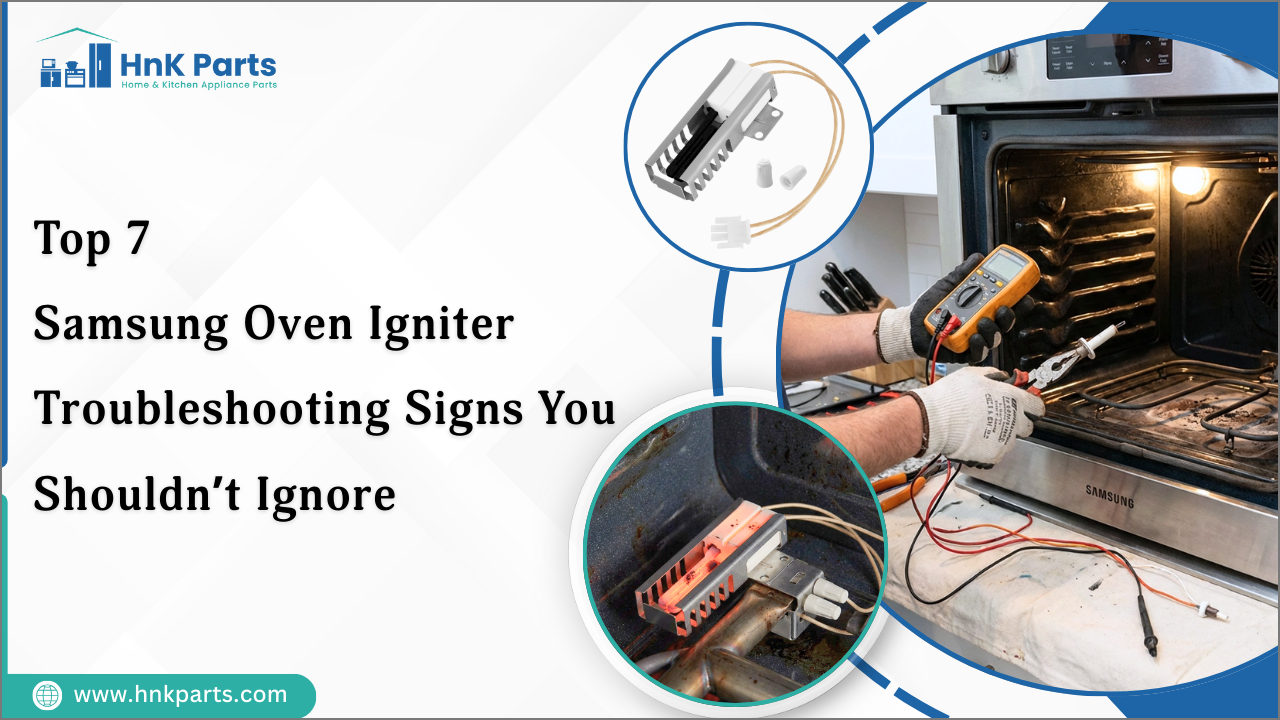
- Bake element, broil element, surface elements, infinite switches, door gasket, temperature sensor, control board.
- Buy OEM when possible
- Original parts fit and perform best; aftermarket parts can be lower cost but risk compatibility.
- Track small details
- Save screws and note wire color positions when removing parts. Take photos to help reassembly.
I once replaced a bake element in under 20 minutes because I photographed connections first. That small step saves time and stress when troubleshooting.

Troubleshooting Checklist and Quick Fixes
Use this checklist for fast Samsung Electric Range Troubleshooting:
- Confirm the unit has power and the breaker is on.
- Try resetting the range by cutting power for one minute.
- Swap a working burner coil to test the socket.
- Inspect elements for visible breaks or burn marks.
- Check oven sensor resistance with a multimeter (usually around 1100 ohms at room temp; consult your manual).
- Clean the touchpad and control panel gently to remove grease.
- Look for error codes and record them.
- If the door won’t lock or unlock, power cycle and try again.
These quick steps solve many common issues and limit unnecessary part replacements.

Frequently Asked Questions of Samsung Electric Range Troubleshooting
How do I reset my Samsung electric range?
Unplug the range or turn off the circuit breaker for 1 to 5 minutes, then restore power. This often clears temporary faults and resets the control board.
Why is my oven not heating evenly?
A faulty temperature sensor, bad bake element, or worn door seal can cause uneven heating. Test the sensor and check the bake element for continuity.
What does the PF or power failure code mean?
PF indicates a power interruption or fluctuation. Reset the range by cutting power briefly; persistent PF codes may need service.
Can I replace a heating element myself?
Yes, if you turn off power and follow safety steps, replacing a visible bake or broil element is often doable. If wiring or the control board is involved, call a technician.
How do I test the oven temperature sensor?
Remove the sensor and measure resistance with a multimeter at room temperature; refer to the service manual for the expected value. If the reading is far off, replace the sensor.
Is it safe to use an appliance with an error code?
Some codes are safe to ignore briefly, but many indicate serious faults. Unplug and troubleshoot or call service to avoid damage or safety hazards.
Conclusion
Samsung Electric Range Troubleshooting is a step-by-step process. Start with safety and power checks, note error codes, test simple parts, and clean and maintain your range to avoid future problems. If a repair seems beyond your skills, call a certified technician to protect your safety and warranty. Try the checklist and tips here, subscribe for more appliance guides, or leave a comment with your model and symptoms so I can help further.

