

Most TV screen issues stem from loose connections, wrong settings, or failing hardware.
I have spent years diagnosing and fixing displays, and this guide on Tv Screen Troubleshooting will walk you through clear checks, proven steps, and real fixes you can try today. I blend hands-on repair experience with simple explanations so you can spot the cause fast, decide what to fix, and avoid costly mistakes.

36% off Today’s Exclusive Deals
Limited-time Exclusive Deals. Check current discount on Amazon.
Check Price on Amazon As an Amazon Associate I earn from qualifying purchases.
Common TV Screen Problems and What They Mean
Knowing common faults helps you narrow down the issue fast. Tv Screen Troubleshooting begins by recognizing symptoms like no picture, flicker, lines, or distorted color. Each symptom points to a different cause: cables, settings, power, or internal boards.
Common problems and quick meanings
- No picture but sound plays: input, loose HDMI, or bad backlight.
- Black screen with no sound: power supply or main board failure.
- Flickering or flashing image: loose cable, bad capacitor, or firmware bug.
- Horizontal or vertical lines: T-con board or panel damage.
- Color issues or tint: wrong color settings or failing display driver.
- Dead pixels or burn-in: panel defects or image retention.
These quick identifications form the backbone of Tv Screen Troubleshooting. They let you choose safe steps to test and decide if professional help is needed.
Quick Checks Before You Panic
Start simple. Most Tv Screen Troubleshooting is quick and safe to do at home. Try these checks first.
Basic checklist
- Power and standby: confirm the TV shows a standby light. Try a different power outlet.
- Remote and power button: press the TV’s physical power button to rule out remote issues.
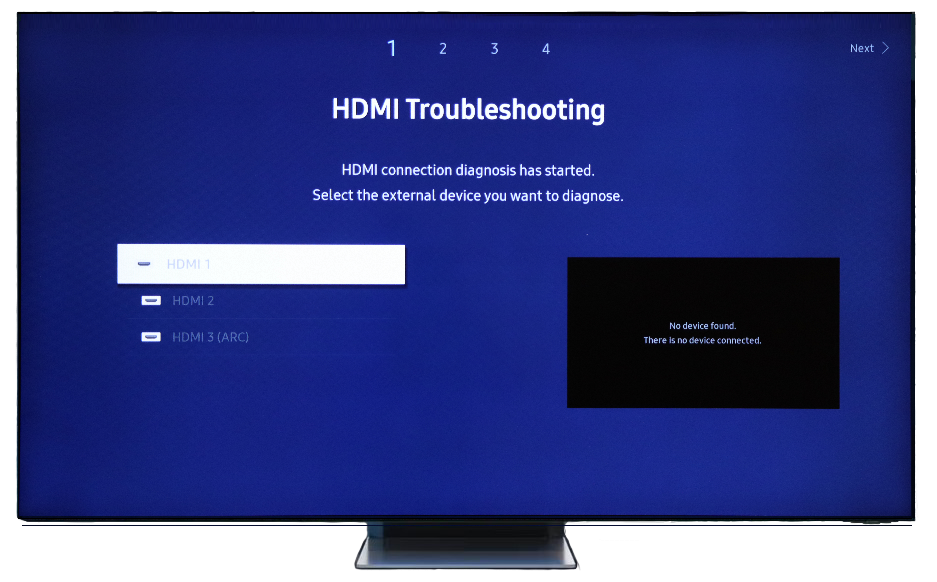
- Input and source: cycle inputs (HDMI1, HDMI2). Use the TV’s input menu to select the correct source.
- Cables and ports: reseat HDMI, component, and power cables. Replace suspect HDMI cables.
- External device check: connect a different device or streaming stick to confirm the TV or the source is at fault.
- Picture settings: reset picture settings to defaults, and disable energy-saving modes that dim backlights.
I once fixed a “dead” TV by simply swapping a worn HDMI cable. Small checks save time and money in Tv Screen Troubleshooting.

Step-by-Step Troubleshooting Guide
Work in ordered steps to isolate the cause. Keep notes of what you try.
Initial steps
- Reboot the TV
- Unplug the TV for 60 seconds, then plug back in. This clears many firmware glitches.
- Test with another input device
- Use a different HDMI device or antenna. If the new device shows a picture, the original source is the issue.
- Try safe mode or factory reset
- If settings are corrupt, a factory reset often restores normal function. Back up app logins first.
Black screen but sound
- Check backlight: shine a flashlight close to the screen; if you see a faint image, the backlight or inverter is failing.
- Listen for clicking: repeated clicks when powering on can mean a bad power board.
- Try external monitor: if the TV has a service port, a technician can test the panel separately.
Flicker, flashing, or intermittent picture
- Re-seat internal and external cables.
- Update firmware if updates are available.
- If flicker remains, suspect failing capacitors on the power board or a loose T-con cable.
Lines, bands, or color blocks
- Run a pixel test pattern or solid color screen.
- Persistent lines across the image usually mean T-con board issues or panel damage.
- Localized spots are likely panel defects; large spreads suggest board failure.
Burn-in and image retention
- Use built-in pixel refresh or screen-saver tools.
- Avoid static images; reduce brightness and enable pixel-shift features.
Dead pixels
- Gentle pressure with a soft cloth, or pixel-fix software, sometimes revives stuck pixels.
- True dead pixels (no light) usually need panel replacement.
Safety note: Turn off and unplug the TV before opening the back. High voltages remain even when unplugged. If you’re not comfortable, call a professional.
Advanced Fixes and When to Call a Professional
Some Tv Screen Troubleshooting requires tools and board-level skill. Know when to DIY and when to stop.
Advanced fixes you can try (if comfortable)
- Firmware flashing: follow manufacturer steps carefully. A wrong file can brick the TV.
- Reseating or replacing T-con board: improves image timing and fixes lines.
- Replacing capacitors on power board: fixes startup and flicker issues, but work needs soldering skills.
- Replacing backlight strips or LEDs: restores brightness for LCDs with failed backlights.
When to call a professional
- No power light or severe electrical smells.
- Panel glass cracked or large sections of the image missing.
- High-voltage work inside CRT or plasma TVs (these are rare and dangerous).
- Cost of parts approaches or exceeds replacement TV price.
In my repair shop, I advise homeowners to call a pro if panel replacement is needed. Panels are costly and fragile; installation is best left to trained technicians.

Preventive Care and Maintenance
Good care reduces the need for Tv Screen Troubleshooting. Simple habits keep screens healthy.
Daily and weekly habits
- Use surge protection to guard the power board.
- Avoid leaving static images on the screen for long periods.
- Keep vents clear and dust-free to prevent heat build-up.
- Lower brightness and enable energy-saving modes to reduce wear.
- Clean the screen gently with a microfiber cloth and approved cleaner.
Annual checks
- Inspect cables and replace worn ones.
- Update firmware to get bug fixes.
- Check wall mounts and stands for secure fit.
These steps extend TV life and reduce sudden failures. Prevention is the best Tv Screen Troubleshooting strategy.
Tools, Parts, and Cost Estimates
Knowing what you need helps plan repairs. Below are common tools and rough cost ranges.
Essential tools
- Screwdriver set for electronics
- Multimeter for voltage and continuity checks
- Soldering iron for capacitor work
- ESD mat and wrist strap for board safety
- Replacement HDMI and power cables for testing
Common parts and ballpark costs
- HDMI cable: $8–$30
- Power board or capacitors: $20–$120
- T-con board: $30–$200
- Backlight strips/LEDs: $30–$150
- Full panel replacement: $150–$600+ depending on size and model
Remember product costs vary by model. Sometimes buying a new TV is more cost-effective than replacing an expensive panel.

People Also Ask — Quick PAA-style Answers
Why is my TV screen black but sound is working?
A black screen with sound usually means a backlight or inverter issue on LCD TVs, or the T-con board is failing. Use a flashlight test and check for faint images.
How can I tell if the problem is the HDMI cable or the TV?
Swap the HDMI cable and use another device or port. If the image returns, the cable or source was the problem.
Can a firmware update fix screen glitches?
Yes, firmware updates often fix bugs that cause flicker or HDMI handshake problems. Always follow the manufacturer’s instructions.
Frequently Asked Questions of Tv Screen Troubleshooting
Why does my TV flicker only on certain apps?
Some apps stream at different frame rates or use HDR, which can reveal playback or display timing bugs. Update the app and the TV firmware, and try toggling HDR/video enhancements.
How do I fix horizontal lines on my TV screen?
Horizontal lines often point to a T-con board or ribbon cable issue. Reseating the T-con cable or replacing the board usually fixes the problem, but panel damage may require a replacement.
Is it safe to replace TV capacitors myself?
Replacing capacitors can be safe if you have soldering skills and unplug the TV for a long time. If you are not trained, seek professional help due to shock risk and complex diagnostics.
What causes color tint or washed-out colors?
Incorrect picture settings, bad HDMI color range, or failing display drivers can cause tints. Reset picture settings, switch color formats, or test with different inputs to isolate the cause.
How long should a TV last before screen problems start?
Modern TVs typically last 7–10 years with normal use, but heavy brightness, poor ventilation, or power surges can shorten lifespan. Regular care delays common failures.
Can a dead pixel spread or get worse over time?
Stuck pixels may sometimes recover, but dead pixels (no light) do not fix themselves and may remain. Panels rarely spread dead pixels, but heat and further damage can reveal more defects.
What’s the best first step when the TV won’t turn on?
Check the power source, try a different outlet, and confirm the standby light is present. If there’s no power and a fuse or surge protector is fine, the internal power board may need repair.
Conclusion
Tv Screen Troubleshooting is about a steady, logical approach: start with simple checks, use safe tests, and move to advanced fixes only when you have the right tools and skills. Adopt basic care habits, keep firmware updated, and use surge protection to prevent many common failures. If you face high-voltage issues or costly panel replacements, reach out to a qualified technician. Try the steps here, share your results below, or subscribe for more repair guides and tips.

