

Most Dolphin pool issues are solvable with step-by-step troubleshooting and basic maintenance.
I have worked with robotic pool cleaners for years and fixed dozens of Dolphin units. This guide on Dolphin Pool Cleaner Troubleshooting is clear, practical, and built from hands-on experience and manufacturer best practices. Read on to learn how to diagnose problems fast, fix common faults, and keep your Dolphin running longer.

36% off Today’s Exclusive Deals
Limited-time Exclusive Deals. Check current discount on Amazon.
Check Price on Amazon As an Amazon Associate I earn from qualifying purchases.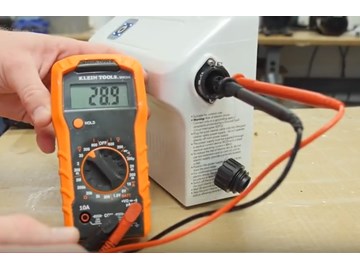
How a Dolphin Pool Cleaner Works
A Dolphin pool cleaner is a self-contained robotic cleaner. It has its own motor, pump, filters, brushes, and drive system. The unit scrubs surfaces, pulls debris into internal filters, and navigates the pool using wheels or tracks and simple sensors. Understanding these parts makes Dolphin Pool Cleaner Troubleshooting easier and faster.
Key components to know:
- Power supply or transformer that feeds the robot
- Drive motors and treads or wheels
- Pump and internal filter canister
- Brushes and scrubbers
- Sensors and on-board electronics
Knowing how each part works helps you match symptoms to causes during Dolphin Pool Cleaner Troubleshooting. Start by checking power, then filters, then mobility, then electronics. This order saves time and avoids needless part replacements.

Common Problems and Step-by-Step Fixes
Below are the most common problems you will see. Each problem has likely causes and clear steps to fix it. Follow these for efficient Dolphin Pool Cleaner Troubleshooting.
Problem: Robot won’t power on
- Causes: Faulty power supply, loose cable, tripped outlet, internal fuse.
- Fix steps:
- Check outlet and reset GFCI or breaker.
- Inspect the transformer light. No light often means transformer failure.
- Check cable for cuts or water inside the cable float.
- Test another known-good outlet or transformer if available.
Problem: Poor suction or not picking up debris
- Causes: Clogged filter, worn seals, blocked intake, low pump speed.
- Fix steps:
- Remove and clean filter cartridges or bag.
- Inspect intake ports for leaves or hair.
- Replace torn or hardened seals and gaskets.
- Run short test; if issue persists, check pump motor for wear.
Problem: Robot gets stuck or doesn’t move well
- Causes: Worn treads or wheels, tangled debris, failed drive motor.
- Fix steps:
- Remove the unit and clear hair, twine, or pool toys.
- Check treads for wear or missing teeth; replace if smooth.
- Manually spin wheels to see if motor resists; a stuck motor needs service.
Problem: Not climbing walls or scrubbing well
- Causes: Low suction, clogged brushes, wrong program, insufficient traction.
- Fix steps:
- Clean brushes and tracks.
- Ensure filter is clean and seats correctly.
- Adjust program to a wall-scrubbing cycle.
- Replace worn brushes or treads.
Problem: Strange noises or grinding
- Causes: Debris in gearbox, failing bearings, worn parts.
- Fix steps:
- Remove debris from motors and gear housings.
- Lubricate moving parts per manual if allowed.
- Replace bearings or gearbox parts when noise persists.
Problem: Error codes or flashing lights
- Causes: Sensor fault, water ingress, communication error.
- Fix steps:
- Note the error pattern from the manual.
- Power cycle the unit and check the transformer.
- Rinse sensors gently and allow to dry.
- If code repeats, contact certified service.
These fixes form the backbone of Dolphin Pool Cleaner Troubleshooting. Start with the easiest checks and move to deeper repairs only when needed. Small parts like filters and brushes often solve a majority of issues.
Maintenance Checklist and Best Practices
Routine care reduces failures and makes Dolphin Pool Cleaner Troubleshooting rare. Use this checklist to keep the unit in top shape.
Weekly
- Clean filter bags or cartridges after each run.
- Rinse debris from the housing and intake.
Monthly
- Inspect treads, brushes, and wheels for wear.
- Check the power cable for pinches or frays.
Seasonal or yearly
- Replace filter cartridges or bags once per season or sooner if worn.
- Inspect seals and gaskets; replace if brittle.
- Have the transformer and motors checked by a pro if performance drops.
Storage tips
- Store the cleaner dry and out of direct sun.
- Coil the power cable loosely; do not kink it.
- Keep the unit off wet ground; use a rack or shelf.
Good maintenance cuts down time spent on Dolphin Pool Cleaner Troubleshooting. From my experience, a quick rinse and filter clean after each use solves most suction and performance issues.

Replacing Parts and When to Call a Professional
Many parts can be replaced at home. Other jobs need a tech. This helps you decide.
Parts you can usually replace yourself
- Filter cartridges and bags
- Brushes and scrubbing pads
- Wheels, treads, and small plastic parts
- External seals and O-rings
Repairs to consider professional service
- Drive motor replacement
- Gearbox repair
- Water-damaged electronics
- Transformer or power supply diagnostics
How to proceed
- Check warranty before opening the unit to avoid voiding coverage.
- Use genuine parts or high-quality aftermarket replacements.
- If you see water in the electronics or smell burnt components, stop and call a pro.
From hands-on repairs, I learned that replacing worn treads and brushes restores most units to near-new performance. Save time and avoid frustration by ordering parts with clear return policies.

Software, Error Codes, and Connectivity Tips
Modern Dolphin cleaners may have apps, firmware, and smart features. These can introduce software faults but also help with Dolphin Pool Cleaner Troubleshooting.
Common software-related steps
- Power cycle the robot and transformer to clear temporary faults.
- Check for app or firmware updates and install per the manual.
- Re-pair the cleaner to your app if connection fails.
- Note error code patterns; refer to the manual code list for quick fixes.
Error code approach
- Record the code and behavior.
- Search the manual or app for the code meaning.
- Try simple fixes: reboot, reset to factory settings, clean sensors.
- If the code persists, professional diagnostics may be required.
Connectivity tips
- Keep the transformer near a stable Wi-Fi source for app updates.
- Do not expose connections to pool water.
- Use short test runs after updates to confirm normal operation.
These software steps are part of Dolphin Pool Cleaner Troubleshooting today. I have seen app updates fix navigation issues and restore connectivity when hardware was fine.

Safety, Warranty, and Cost Considerations
Safety first. Always unplug the transformer and remove power before servicing the unit. Follow these simple rules.
Safety tips
- Never open the sealed motor housing unless trained.
- Use dry hands when handling the plug and transformer.
- Keep children and pets away from the pool when testing the cleaner.
Warranty and costs
- Check your warranty period before making repairs.
- Simple parts like filters and brushes are low cost.
- Major repairs like motors or electronics can rival the price of a new unit.
When to replace
- If repair costs exceed 50–60% of a new unit and the cleaner is older than five years, consider replacement. This balances cost and expected lifespan.
Transparency note: repairs and prices vary. Always get a quote from an authorized service center for major work.
People Also Ask
What should I check first when my Dolphin pool cleaner stops working?
- Check power to the transformer, outlet GFCI, and the cable for damage. Then clean the filter bag and intake.
How often should I clean the filter?
- Clean the filter after each use for best performance. At minimum, rinse it weekly during heavy use.
Can a clogged filter make the Dolphin not climb walls?
- Yes. Low suction from a clogged filter reduces traction and climbing ability. Clean the filter to restore suction.
How long do brushes and treads usually last?
- Brushes and treads last one to three seasons depending on use and pool surface. Replace them when visibly worn or performance drops.
Is it safe to open the motor housing to inspect electronics?
- No. Opening the motor housing can void warranty and risk injury. Leave internal electronics to trained technicians.
Frequently Asked Questions of Dolphin Pool Cleaner Troubleshooting
Why does my Dolphin stop mid-cycle and float?
Most times this means low suction due to a clogged filter or blocked intake. Clean filters, check for debris, and restart the cycle to see if it completes.
The cleaner runs but misses big debris. What should I do?
Check and clean the filter canister and intake. Large debris can get stuck in the inlet; remove it and test again.
My Dolphin returns to the stairs often. Is this a navigation problem?
Stairs attraction is common if sensors are confused or if the unit is in an edge-only mode. Clean sensors and try a different cleaning program.
The power cable feels hot. Is that normal?
A slightly warm transformer is normal, but a hot cable or plug is not. Unplug and inspect for damage; then consult service if it stays hot.
How can I extend my cleaner’s life?
Regular cleaning, replacing wear parts, storing dry, and avoiding sharp debris will extend lifespan. Follow the maintenance checklist above for best results.
There’s a steady drip inside the robot after use. Is it broken?
A small amount of water near seals can happen, but steady drip means a compromised seal or housing. Stop use and get a seal replacement to prevent electronics damage.
Conclusion
Dolphin Pool Cleaner Troubleshooting is mostly about method: check power, filters, mobility, and electronics in that order. With regular care and a few simple fixes, most issues are easy to solve at home. Start small, track patterns, and don’t hesitate to call a pro for sealed electronics or complex repairs. Try the checklist here this week, and leave a comment with your issue so others can learn from your experience.

