

Fix DSL router issues by restarting, checking cables, and confirming ISP line sync.
I have spent years fixing home and small-office networks, so this guide on Dsl Router Troubleshooting breaks down simple checks, clear steps, and deeper fixes. You will learn how to identify common DSL problems, test line and modem health, change router settings safely, and decide when to call your ISP or replace hardware.

36% off Today’s Exclusive Deals
Limited-time Exclusive Deals. Check current discount on Amazon.
Check Price on Amazon As an Amazon Associate I earn from qualifying purchases.
Common DSL Router Problems and What They Mean
DSL router trouble often looks similar across homes. Slow speed, dropped connections, no internet light, or intermittent service are common signs. Each symptom points to different causes—router, modem, phone line, or ISP issues.
Common causes include:
- Faulty or loose cables affecting DSL sync.
- Incorrect router configuration or outdated firmware.
- Electrical or line noise from phone wiring.
- ISP outages or service throttling.
- Hardware failure in the router or DSL modem.
What to watch for:
- Solid DSL light but no internet light means PPPoE or credentials issue.
- Blinking DSL light often means line resync or noise.
- Slow speed with solid lights suggests congestion or poor SNR.
- Frequent drops at certain times can indicate line interference.
These basics frame how you approach Dsl Router Troubleshooting. Start simple. Work toward complex fixes only when needed.

Quick Basic Troubleshooting Steps (Tier 1)
Begin with low-effort checks. These often fix 70% of Dsl Router Troubleshooting cases.
Step-by-step:
- Power cycle router and modem. Unplug for 30 seconds, then plug back in.
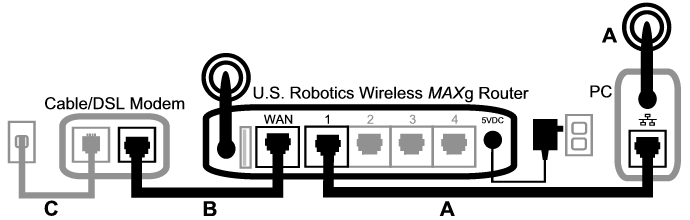
- Check all cables. Reseat DSL, Ethernet, and power cables firmly.
- Verify filters on phone lines. Use microfilters where needed for phones.
- Test with a single device. Rule out Wi‑Fi or device-specific issues.
- Check ISP status. Use mobile data or a provider status page to confirm outages.
Why these steps work:
- Power cycles clear temporary faults.
- Loose cables break the physical link.
- Filters and wiring reduce noise that kills DSL sync.
If these steps fail, move to line and configuration checks in the next section.

Line and Signal Checks (Tier 2)
When basic steps fail, check the DSL line and signal quality. These checks need simple tools or router status pages.
How to check:
- Access the router status page. Look for SNR margin and attenuation values.
- SNR margin above 6 dB is usable; below 6 dB can cause drops.
- High attenuation shows long or poor-quality lines and explains slow speeds.
- Swap the DSL cable and test again. A bad cable can cause noise.
- Use a plain phone at the wall jack. Listen for static or clicks on the line.
PAA-style question: What is SNR margin and why it matters?
- SNR margin measures signal strength over noise. Low SNR causes errors and drops.
If the line shows poor numbers, log them and call the ISP. They can run tests and dispatch a tech. Keep a record of your Dsl Router Troubleshooting steps and results.

Router Settings and Configuration
Misconfigured routers often make a working DSL line seem dead. Check and correct these settings.
Key settings to review:
- Connection type. Most DSL providers use PPPoE and require a username and password.
- VLAN tagging. Some ISPs require specific VLAN ID for internet traffic.
- MTU size. Wrong MTU can cause slow or failed downloads—typical MTU for PPPoE is 1492.
- DNS settings. Use ISP DNS or public DNS like 1.1.1.1 or 8.8.8.8 to test resolution.
- Firmware. Always run the latest stable firmware from the router vendor.
How to proceed:
- Back up current router settings before changes.
- Enter PPPoE credentials exactly as provided by your ISP.
- Reset to factory settings only if you have saved login details.
- After changes, reboot the router and test speed and stability.
Personal tip: I once fixed a stubborn drop by enabling "Keep Alive" or "Reconnect on failure" in the router. Small options can stop frequent reauths.
Advanced Troubleshooting and Tools (Tier 3)
For persistent problems, use targeted tools and tests. These steps help isolate hardware vs. line issues.
Advanced steps:
- Connect a computer directly to the DSL modem (if separate) to rule out router Wi‑Fi issues.
- Run ping and traceroute tests to check latency and routing problems.
- Use DSL loopback tests if available on your modem for line diagnostics.
- Swap in a known-good router or modem to see if the issue follows the device.
- Check for microfilters or splitters causing attenuation; remove all non-essential devices from the line.
Tools you can use:
- Ping and traceroute built into all OS.
- Router logs and DSL stats pages.
- USB DSL analyzers or line testers for pros.
When to call a technician:
- Persistent low SNR or high attenuation after swapping cables.
- Line noise heard on multiple phones.
- ISP remote tests fail to resolve the issue.
My experience: I replaced a router for a client only to find the ISP had a damaged cabinet line. Swapping hardware first is useful, but do not ignore ISP-side faults.
When to Contact Your ISP or Replace Hardware
Knowing when to escalate saves time and money. Use this checklist to decide.
Call your ISP if:
- Line shows poor DSL stats or no sync after testing.
- There’s a confirmed outage or your account shows errors on ISP portal.
- Remote tests from ISP indicate a line fault or cabinet issue.
Replace hardware if:
- A different router/modem solves the issue during testing.
- The router is old, unsupported, or frequently overheats.
- Firmware updates fail and vendor support has ended.
Practical advice:
- Keep a record of troubleshooting steps and times of outages.
- Ask the ISP to run a line test and schedule a tech visit if needed.
- Consider buying a quality DSL modem/router combo recommended for your ISP.
I once delayed an ISP call and lost two days of work. Calling early with clear test data speeds up resolution.

Preventive Maintenance and Best Practices
Preventing problems is easier than fixing them. Small habits keep DSL routers stable.
Routine checks:
- Reboot routers monthly to clear memory leaks.
- Keep firmware up to date and secure the admin interface with a strong password.
- Use quality cables and replace old phone wiring where needed.
- Place the router in a ventilated spot to avoid heat-related failures.
Security tips:
- Change default admin passwords.
- Disable remote admin access unless needed.
- Enable WPA2/WPA3 and guest networks for visitors.
Long-term planning:
- Consider a backup connection for critical work, like mobile tethering or secondary ISP.
- Replace equipment aging beyond four to five years.
These steps reduce the frequency of Dsl Router Troubleshooting tasks and improve uptime.
Personal Experience and Practical Tips
I have fixed dozens of home DSL issues. Here are lessons I learned the hard way.
What helped me most:
- Keep clear notes. Write down PPPoE and VLAN details and any ISP case numbers.
- Start simple. Most fixes come from cables, filters, and a quick reboot.
- Test one change at a time to know what worked.
Common mistakes to avoid:
- Resetting the router without saving settings or credentials.
- Ignoring line noise reported by phones.
- Replacing gear without isolating the problem to the hardware.
Friendly tip: Treat troubleshooting like a recipe. Follow steps in order, measure outcomes, and change only one ingredient at a time. It keeps stress low and results clear.
Frequently Asked Questions of Dsl Router Troubleshooting
What should I do if my DSL light is off but power is on?
Check the phone line connection and filters, then reboot the modem and router. If the DSL light stays off, contact your ISP for a line test, as the issue may be outside your home.
Why is my internet slow even with full signal lights?
Slow speeds can come from high line attenuation, low SNR, ISP congestion, or router load. Test with a wired device, check DSL stats, and run a speed test to narrow the cause.
How do I find PPPoE credentials for my router?
Check your ISP welcome email or account portal, or call the ISP support line to request them. Save credentials securely before configuring the router.
Can old phone wiring cause DSL drops?
Yes, old or damaged wiring increases noise and attenuation, causing frequent disconnects. Replace or test wiring and use a direct wall jack test to confirm.
Is it better to use the ISP modem or a third-party router?
Use vendor-recommended hardware for compatibility, but quality third-party routers offer better features and longevity. Ensure any third-party device supports DSL and your ISP’s settings.
How often should I update router firmware?
Check for firmware updates every few months and install stable releases promptly to fix bugs and security flaws. Backup settings before updating to avoid losing configuration.
Conclusion
Dsl Router Troubleshooting becomes simple with a clear plan: start with power and cables, check line stats, confirm settings, and escalate to ISP or hardware swaps when needed. Use short tests, keep records, and make one change at a time to find the root cause quickly. Take action today by running the basic checks listed here, saving your results, and contacting your ISP if the line stats look poor. Share your experience or ask a question below to get targeted help or subscribe for more hands-on network tips.

