

Most Honeywell cooling issues are simple: check power, settings, wiring, and the outdoor unit.
I have worked with thermostats and HVAC systems for years. I wrote this guide to help you fix Honeywell Thermostat Troubleshooting Not Cooling issues fast. This post explains likely causes, clear step-by-step checks, and when to call a pro. Read on for practical tips, real-world fixes, and safety notes that save time and money.

36% off Today’s Exclusive Deals
Limited-time Exclusive Deals. Check current discount on Amazon.
Check Price on Amazon As an Amazon Associate I earn from qualifying purchases.
Why a Honeywell Thermostat Might Not Cool
Thermostats tell your air conditioner when to run. When they fail, cooling stops. Honeywell Thermostat Troubleshooting Not Cooling starts with identifying cause. Common causes include power issues, bad settings, wiring faults, and HVAC failures.
Common root causes
- Dead batteries or weak power from the R wire causing intermittent operation.
- Thermostat set to heat, fan only, or incorrect mode.
- Loose or incorrect wiring between thermostat and furnace/air handler.
- Faulty C-wire or missing common causing digital thermostats to brown out.
- Outdoor unit problems: tripped breaker, capacitor failure, or refrigerant leak.
- Dirty filters and blocked returns reducing airflow and freezing coils.
- Software bugs or outdated firmware on smart Honeywell models.

Quick Checks to Try First
Start with easy fixes. These take minutes and often solve the problem.
Simple steps
- Confirm thermostat is set to COOL and temperature is lower than room temp.
- Replace thermostat batteries if model uses them.
- Check circuit breakers for the HVAC system and outdoor unit.
- Look at the thermostat display for error codes or blank screens.
- Replace or clean the HVAC air filter if dirty.
- Make sure vents are open and registers are not blocked.
If these do not help, move to the steps below for Honeywell Thermostat Troubleshooting Not Cooling.
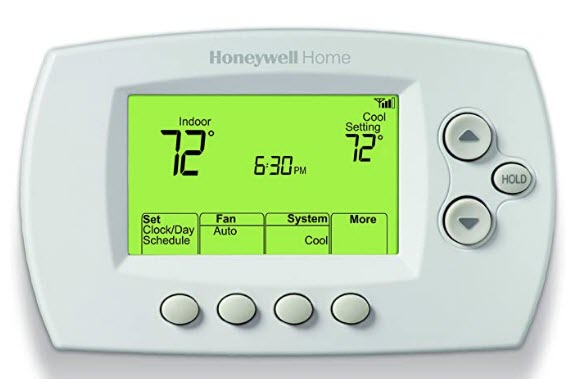
Step-by-Step Honeywell Thermostat Troubleshooting Not Cooling
Follow this ordered checklist. Work slowly. Test after each step.
- Verify thermostat mode and temperature
- Set to COOL and lower target temperature by several degrees.
- Listen for a click from the thermostat. Click often means control signal sent.
- Check power and batteries
- Replace AA or AAA batteries when present.
- Confirm display is bright and stable.
- If display blinks or resets, suspect low voltage on the R wire.
- Inspect breakers and outdoor unit
- Reset any tripped breakers for the HVAC and condenser.
- Walk outside and check if the condenser fan runs when cooling should be on.
- Examine wiring at the thermostat
- Turn off power at the breaker first.
- Remove cover and inspect wire connections for R, C, Y, G, W, and O/B.
- Tighten loose wires and confirm correct terminals.
- Test 24VAC at the thermostat
- Use a multimeter to read between R and C. Expect ~24 VAC.
- If no voltage, trace to furnace or air handler power board.
- Check the control board and contactor
- If thermostat calls for cooling (Y energized) but condenser does not run, check the contactor and fuse at the outdoor unit.
- Replace blown fuses or faulty contactors cautiously.
- Consider thermostat software and compatibility
- For smart Honeywell models, check Wi‑Fi and app alerts.
- Confirm thermostat is configured for your system type: conventional vs heat pump, single vs multi-stage.
I once fixed a client’s cooling in under ten minutes. The thermostat was wired to Rc only. A loose jumper meant the C-wire was not connected. Adding a proper common wire solved it. Small wiring problems are common.

Advanced Diagnostics and Tools
Use these when basics fail. Advanced checks require tools and care.
Tools you may need
- Multimeter for voltage checks.
- Small screwdriver and wire labels.
- HVAC compressor gauges if checking refrigerant (pro hire recommended).
- Clamp meter for outdoor unit current draw.
Advanced tests
- Measure voltage R to C during call for cooling. Voltage drop under load means weak transformer or wiring.
- Check Y terminal continuity when thermostat calls for cooling.
- Inspect air handler for error codes and LED blink patterns.
- Use a clamp meter to see if the compressor draws normal current.
- Test thermostat internal relays on some Honeywell models with service mode or diagnostics.
If you are not comfortable with electrical testing, call a licensed HVAC or electrician. Safety matters.
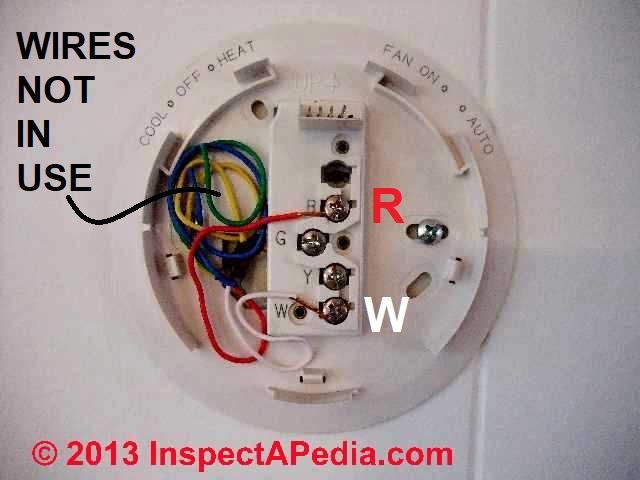
Wiring, Power, and Compatibility Issues
Wiring mistakes are a top cause of Honeywell Thermostat Troubleshooting Not Cooling. Fixes are often straightforward.
Common wiring problems
- Missing C-wire on smart thermostats causing brownouts.
- Miswired O/B on heat pump systems reversing calls.
- Shared or mislabeled wires from older systems.
- No common transformer for digital displays.
Solutions
- Add or repurpose a C-wire or use a power adapter kit.
- Use proper terminal mapping. Confirm system type in settings.
- For heat pumps, confirm O/B settings and change software if needed.
- If wiring is beyond your skill, hire a pro to run a new C-wire.

When the HVAC Unit, Not the Thermostat, Is the Issue
Sometimes the thermostat works fine. The outdoor unit or air handler may fail.
Signs HVAC is at fault
- Thermostat shows call for cooling but condenser stays off.
- Outdoor unit hums but fails to start.
- Frozen evaporator coil or blocked drain lines.
- Low refrigerant noticeable by warm air from vents and hissing sounds.
What to do
- Check outdoor unit breaker and disconnect switches.
- Look for visible damage to fan blades or debris clogging the condenser.
- Replace capacitors or contactors only if you know how. These parts can hold charge.
- Call licensed HVAC tech for refrigerant issues and compressor failures.

Resetting, Replacing, or Updating Your Honeywell Thermostat
Resetting sometimes clears faults. Replacement might be needed for old units.
Reset and update
- Soft reset: remove thermostat from base for 30 seconds and reattach.
- Factory reset: follow model-specific steps in the manual.
- Check the app for firmware updates on smart thermostats.
When to replace
- Thermostat is older than 10 years and unreliable.
- Display fails, internal components corroded, or no firmware support.
- You want smart features or better compatibility with your HVAC.
When replacing, buy a model that supports your system type. Use official wiring guides.
Preventive Maintenance and Tips to Avoid Future Cooling Failures
Prevent problems with routine care. Small habits prolong system life.
Maintenance checklist
- Replace air filters every 1–3 months.
- Keep outdoor unit free of debris and trim plants.
- Schedule annual HVAC tune-ups in spring.
- Update thermostat batteries yearly if applicable.
- Avoid installing thermostat near heat sources or direct sun.
Practical tips
- Use a programmable schedule to reduce wear on the system.
- Label wires when removing old thermostats to avoid wiring mistakes.
- Keep thermostat firmware up to date and check app alerts for errors.

Common user questions
What should I try first if my Honeywell thermostat is not cooling?
- Check the thermostat mode, batteries, and setpoint. Then inspect breakers and filters. These quick steps fix many issues.
How do I know if the thermostat is sending a cooling signal?
- Listen for a click at the thermostat when you lower the set temperature. Use a multimeter to check Y terminal voltage for a definitive test.
Can Wi‑Fi or app issues stop cooling on smart Honeywell thermostats?
- App connectivity does not usually stop basic control. However, firmware bugs or cloud problems can affect advanced features. Local calls to the HVAC system still work in most cases.
Is a C-wire necessary for Honeywell smart thermostats?
- Most smart models need a stable common (C) wire for power. Without it, the thermostat may lose power and not call for cooling.
When is it time to call a professional HVAC technician?
- Call a pro for refrigerant, compressor, or complex electrical faults. Also call when you cannot safely access or test components.
Frequently Asked Questions of Honeywell Thermostat Troubleshooting Not Cooling
Why is my Honeywell thermostat not cooling but the fan is running?
This often means the thermostat can control the fan but the cooling call is not reaching the outdoor unit. Check Y terminal wiring and outdoor unit power or contactor.
How do I test the Y and C connections on my Honeywell thermostat?
Turn off power, expose the wires, then use a multimeter during a cooling call to measure voltage from R to Y and R to C. Expect around 24 VAC.
My Honeywell thermostat shows an error code. What should I do?
Note the code, consult the manual, and follow troubleshooting steps. Many codes point to wiring, sensor, or communication issues.
Can a dirty filter make my thermostat think cooling is working?
A dirty filter can reduce airflow and freeze the evaporator coil. The thermostat may still run, but cool air will not reach rooms.
Will resetting the Honeywell thermostat fix cooling problems?
A reset can clear software glitches and lost connections. If the issue is wiring or HVAC hardware, resetting will not fix it.
How often should I get HVAC maintenance to prevent thermostat problems?
Annual spring maintenance is best. Regular service keeps the system reliable and reduces thermostat-related issues.
Conclusion
Honeywell Thermostat Troubleshooting Not Cooling is usually solvable with calm, logical checks. Start with mode, batteries, breakers, and filters. Move to wiring and voltage tests next. If the outdoor unit or refrigerant is at fault, call a licensed technician. Small fixes often save time and money. Take action: try the quick checks today, schedule a tune-up, or ask a pro if you feel unsure. Share your experience or questions below, and subscribe for more practical HVAC tips.

