

A practical, step-by-step Plasma Cutter Troubleshooting Guide to fix common cuts, arc, and power issues.
I have used plasma cutters in shops and on job sites for years. This Plasma Cutter Troubleshooting Guide will help you diagnose faults fast. You will learn simple checks, root causes, and fixes. I show what I do when a cutter won’t start, has poor cut quality, or trips breakers. Read on to save time and avoid costly repairs with clear, safe steps.

36% off Today’s Exclusive Deals
Limited-time Exclusive Deals. Check current discount on Amazon.
Check Price on Amazon As an Amazon Associate I earn from qualifying purchases.
How a plasma cutter works and why troubleshooting matters
A plasma cutter uses ionized gas to cut metal. It makes a plasma arc between an electrode and the workpiece. That arc melts metal and blows it away. Knowing the parts helps with the Plasma Cutter Troubleshooting Guide. Key parts are the power supply, torch, electrode, nozzle, gas supply, and ground clamp. Problems usually trace to one of these items.
Common reasons to troubleshoot:
- Poor cut quality costs time and metal.
- Electrical faults risk safety and damage.
- Regular checks extend tool life.
I have fixed many machines by checking torch consumables first. Replacing a worn nozzle often restores cut quality faster than complex fixes.
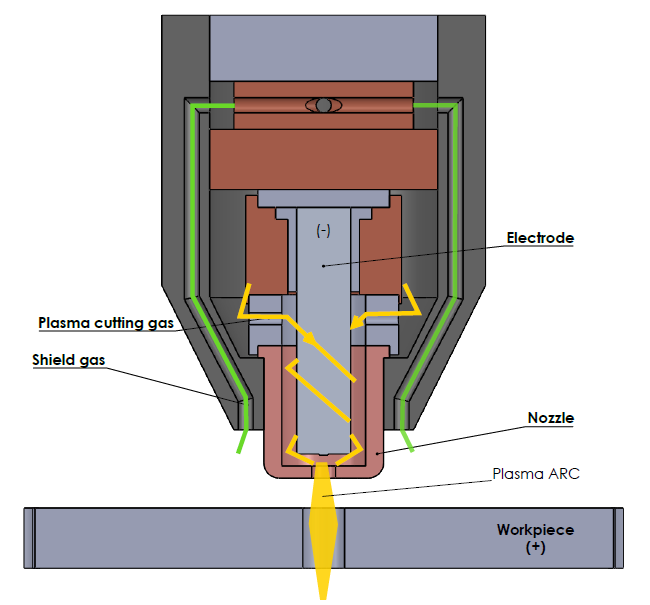
Common problems, symptoms, and likely causes
This Plasma Cutter Troubleshooting Guide covers common faults. I list symptoms, causes, and quick checks.
Symptom: Machine won’t power on
- Likely cause: No power, blown fuse, faulty switch, or internal fault.
- Quick checks: Test outlet with a known device, inspect power cord and plug, check main fuse or breaker.
Symptom: Pilot arc won’t start
- Likely cause: Dirty or worn electrode or nozzle, bad grounding, or gas valve issue.
- Quick checks: Inspect consumables, confirm ground clamp is tight to clean metal, listen for gas flow.
Symptom: Arc drops out or is unstable
- Likely cause: Poor air/gas pressure, loose connections, or overheating.
- Quick checks: Check air compressor pressure and dryer, look for loose torch wires, ensure cooling fan runs.
Symptom: Dross or heavy slag forms on cut
- Likely cause: Wrong travel speed, incorrect current, or worn consumables.
- Quick checks: Compare speed and amps to chart, swap nozzle and electrode if worn.
Symptom: Excessive noise, sparks, or smoke
- Likely cause: Faulty torch or internal short.
- Quick checks: Power off, inspect torch wiring, and examine internal electronics for burn marks.
These checks follow a logical path. Start with the simplest fix. Consumables and ground are often the culprit in my experience.
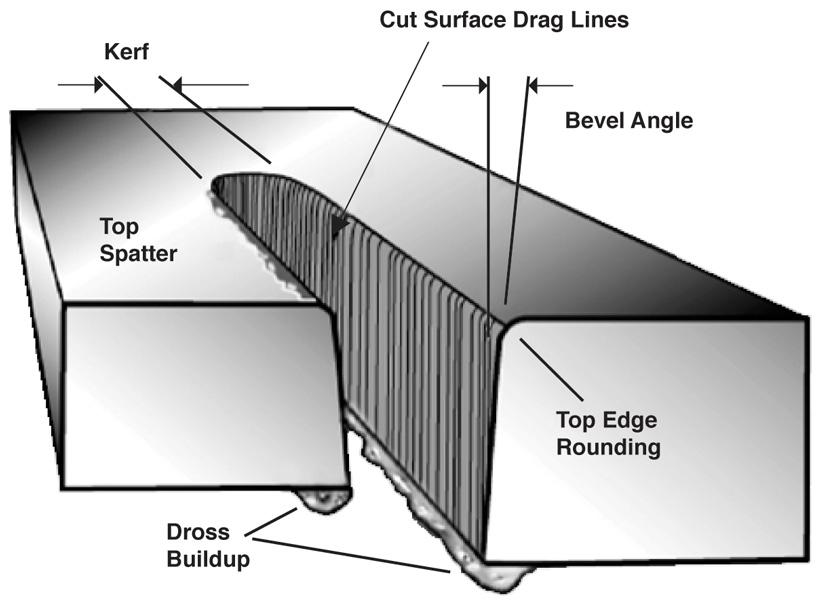
Step-by-step troubleshooting checklist
Use this checklist from simple to advanced. The Plasma Cutter Troubleshooting Guide below follows safe order.
- Safety first
- Turn off power and unplug the machine when inspecting.
- Wear gloves, eye protection, and avoid flammable materials.
- Verify power and settings
- Confirm outlet voltage matches machine rating.
- Check breakers, fuses, and power cord condition.
- Inspect consumables
- Remove torch tip and electrode.
- Replace if worn, pitted, or melted.
- Check gas/air supply
- Confirm proper pressure and flow.
- Drain moisture from the air line and check the filter.
- Verify grounding
- Clean the workpiece where ground clamps attach.
- Tighten clamp connection and test continuity if needed.
- Examine torch and leads
- Look for frayed cables, broken pins, or loose fittings.
- Replace damaged leads to prevent intermittent arcs.
- Test control functions
- Use machine self-tests if available.
- Cycle controls to verify trigger and pilot arc activation.
- Monitor temperature and duty cycle
- Let the machine cool if overheated.
- Check the duty cycle chart and adjust for long cuts.
- Check internal components
- Only qualified techs should open the case.
- Inspect contactors, capacitors, and wiring for damage.
- Call support or a pro
- If basic fixes fail, contact manufacturer support or a certified service tech.
I once fixed a persistent arc drop by replacing a cheap inline air dryer. Small parts matter.
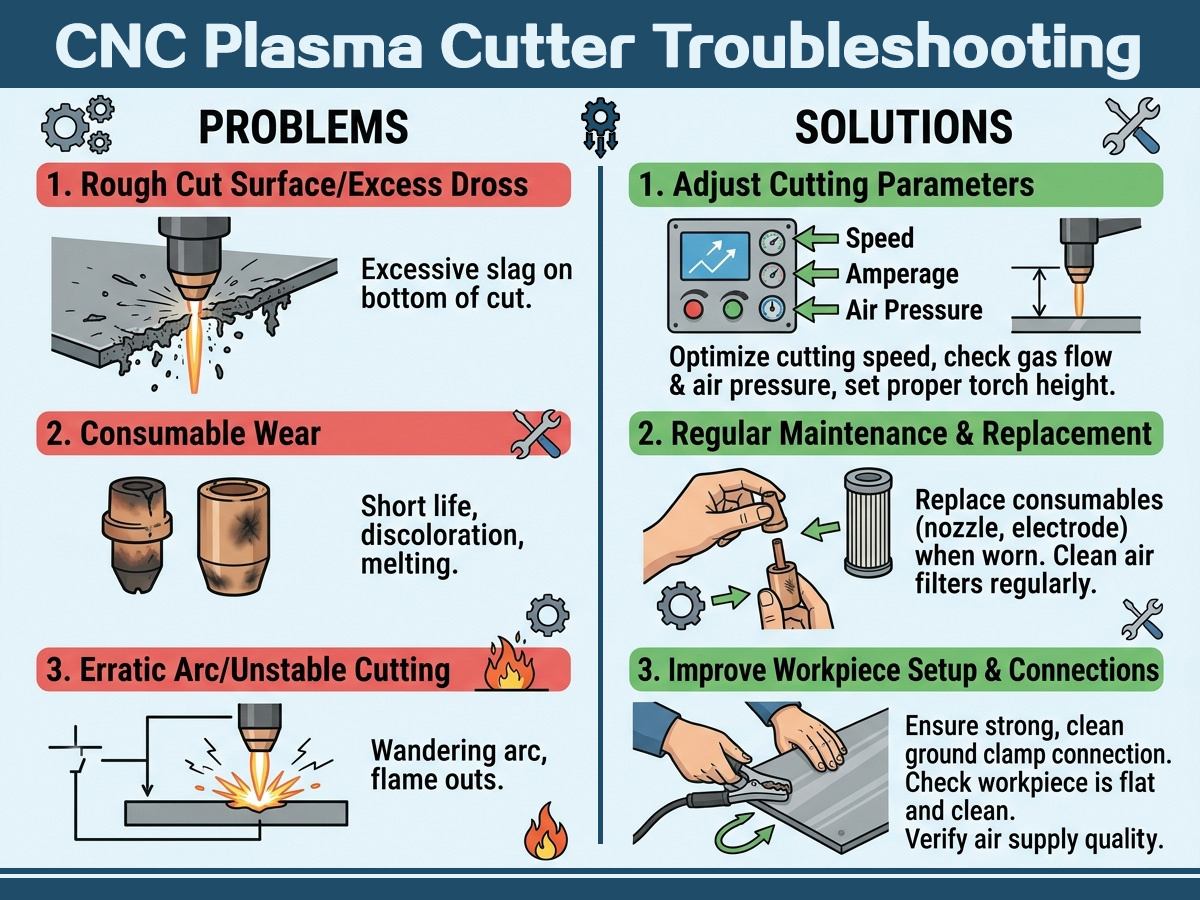
Troubleshooting poor cut quality: practical tips
Poor cut quality is the most frequent issue in this Plasma Cutter Troubleshooting Guide. Follow these checks.
- Verify amperage vs material thickness
- Too low amps cause slow, wide cuts. Too high amps burn more metal.
- Confirm correct nozzle size and type
- Use matched consumables from the maker when possible.
- Match travel speed
- Move too slow and slag builds. Move too fast and the cut won’t go through.
- Check standoff distance
- Keep torch tip distance steady. Use a drag shield or guide if needed.
Example: For 1/4 inch steel, I set the recommended amps and kept a steady hand at the right standoff. The cut improved instantly.
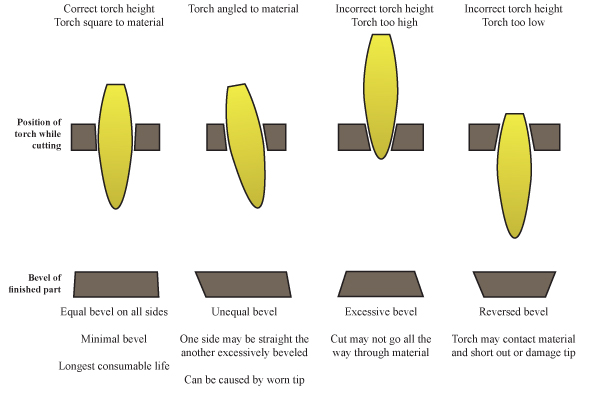
Electrical and air system troubleshooting
Electrical and air faults can be subtle. This part of the Plasma Cutter Troubleshooting Guide helps you isolate them.
Electrical checks:
- Measure input voltage under load.
- Inspect ground continuity from machine to workpiece.
- Listen for relay chatter or buzzing.
Air system checks:
- Check compressor pressure and tank fill.
- Inspect air lines for leaks and moisture.
- Replace inline filters and regulators on schedule.
If the compressor can’t keep up during long cuts, the arc will break. I learned to size the compressor to the cutter’s scfm rating.
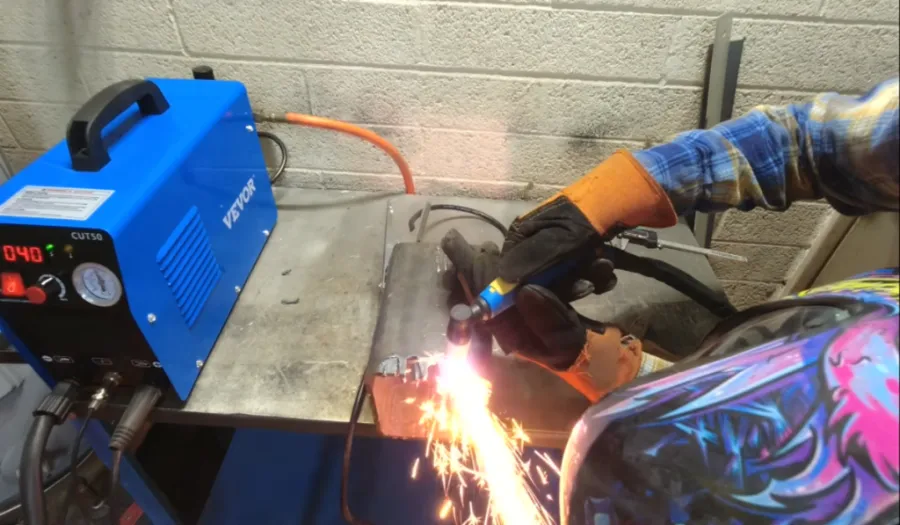
Consumables: selection, wear signs, and replacement timing
Consumables are cheap and wear fast. A good consumable plan is a core part of any Plasma Cutter Troubleshooting Guide.
Signs of worn consumables:
- White or pitted electrode face.
- Nozzle diameter looks larger or irregular.
- Rough or uneven pilot arc.
Replacement guidance:
- Replace electrode and nozzle as a pair.
- Keep extra tips for different material types and thicknesses.
- Use OEM or high-quality third-party parts.
I keep a labeled box of consumables for each cutter. That saves 15–30 minutes per job.

When to call a professional and parts replacement cost guide
Some faults need a pro. Use this part of the Plasma Cutter Troubleshooting Guide to decide.
Call a pro if:
- You find burned wiring or smell burning inside the unit.
- The machine trips multiple breakers after basic checks.
- Internal component replacement is needed and you lack certification.
Typical part costs:
- Electrode and nozzle set: low cost.
- Torch lead assembly: moderate cost.
- Power supply board or inverter: high cost.
Be transparent with the tech about steps you tried. It speeds up repairs and reduces costs.
Safety checks and best practices
Safety is key in any Plasma Cutter Troubleshooting Guide. Follow these rules to protect yourself and your shop.
- Always wear eye and skin protection rated for plasma work.
- Keep a fire extinguisher nearby when cutting.
- Ensure proper ventilation to remove fumes and particulates.
- Disconnect power before internal inspections.
- Follow the machine’s duty cycle to avoid overheating.
I once avoided a fire by keeping a metal bucket of water near a cutting area. It helps to plan for sparks.

People also ask — quick answers
Q: Why does my plasma cutter arc intermittently?
A: Intermittent arc often comes from dirty consumables, loose ground, or low air pressure. Clean parts and tighten connections first.
Q: Can I use any compressor with my plasma cutter?
A: You need a compressor that meets the cutter’s scfm and psi specs and includes a moisture trap. Low flow causes arc failure.
Q: How long do consumables last?
A: Lifespan depends on use, amps, and material. Light hobby use may stretch weeks; shop use can wear parts in hours.
Frequently Asked Questions of Plasma Cutter Troubleshooting Guide
Why won’t my plasma cutter start when I press the trigger?
Check power input, fuses, and the trigger switch. Confirm gas flow and inspect torch wiring for damage.
My cuts have heavy dross. What should I try first?
Increase travel speed slightly, verify amperage for the thickness, and replace worn nozzle and electrode.
The pilot arc works but the main arc won’t transfer. Why?
This often means poor ground contact or incorrect standoff. Clean the workpiece and tighten the ground clamp.
The machine overheats during long cuts. How do I prevent this?
Respect the duty cycle, allow cool-down breaks, and ensure cooling fans and vents are clear of dust.
How do I know if the inverter or power board is bad?
Look for burning smells, visible damage, or repeated trips after other fixes. A pro should test high-voltage components.
Conclusion
This Plasma Cutter Troubleshooting Guide gives you a clear path from simple checks to professional repair. Start with power, consumables, ground, and air. Use the checklist to limit trial-and-error and save time. My main tip: replace cheap consumables early and keep spares on hand. Try the steps, keep safety first, and log problems to spot patterns over time. If you found this guide useful, subscribe for more tips, leave a comment with your issue, or share a photo of your cutter for tailored advice.

