

Most Whirlpool electric range error codes point to sensors, control boards, or power issues.
I have worked on dozens of Whirlpool ranges and written repair guides for years. This article explains Whirlpool Electric Range Troubleshooting Codes clearly, with step-by-step fixes, safety tips, and real-world advice so you can diagnose problems faster and decide when to DIY or call a pro. Read on to learn how to identify codes, what they mean, and practical ways to resolve them.

36% off Today’s Exclusive Deals
Limited-time Exclusive Deals. Check current discount on Amazon.
Check Price on Amazon As an Amazon Associate I earn from qualifying purchases.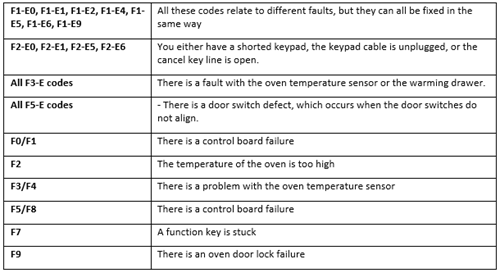
How Whirlpool Electric Range Troubleshooting Codes Work
Whirlpool Electric Range Troubleshooting Codes are short messages the range uses to flag problems. They show on the display as letters, numbers, or a combination like F3E0 or PF. The codes map to parts: keypad, control board, sensor, or power. Knowing how codes work helps you find the right fix fast.

Common Whirlpool Electric Range Troubleshooting Codes and What They Mean
Below are common codes you might see and what they usually indicate. Note that exact meanings can vary by model. Always check your model’s service sheet when available.
-
F1E0 or F1E1
Typically points to a keypad or user interface fault. If the keypad sticks or a button is shorted, the control will show this. Try resetting power first, then inspect the control panel. -
F2E0 or F2E1
Often a control board or display communication fault. This can occur after a spike or failed component. A board reset may help but board replacement may be needed. -
F3E0 or F3E1
Indicates oven temperature sensor short or open. The sensor is easy to test with a multimeter and cheap to replace. Expect about 1100 ohms at room temperature for a healthy sensor. -
F5 or F5E0
Usually an oven over-temperature or relay issue. The range sensed a runaway heat condition. Stop using the oven until the source is found. -
F6, F7, F8 series
These often point to control or relay failures, or stuck keys. Symptoms include unresponsive controls or heating that won’t turn off. -
F9 or F9E0
Can mean a cooling fan, thermal fuse, or related safety limit issue. If the oven ran too hot, a safety device may have opened. -
PF (Power Failure)
Shows after a brief power cut. Often harmless; reset the clock and check operation. -
LOC or Control Lock
The control lock or child lock is active. Hold the lock button or follow the user guide to unlock.

Reading and Capturing Whirlpool Electric Range Troubleshooting Codes
Capture the code exactly. Take a photo or write it down. Codes like F3E0 and F3E1 are different even though they start the same.
Steps to capture a code:
- Stop use immediately to avoid damage.
- Turn off power at the breaker for 30 seconds to reset.
- Turn power back on and see if the code returns.
- Note whether the code appears during a specific cycle or after a power event.
This helps narrow whether it’s intermittent, heat-related, or permanent.

Step-by-Step Troubleshooting for Whirlpool Electric Range Troubleshooting Codes
Follow these steps to diagnose common faults. Always put safety first.
-
Reset power
- Turn the circuit breaker off for 30 seconds.
- Turn it back on and see if the code clears.
-
Inspect visible parts
- Check control panel for stuck buttons or spills.
- Look under the cooktop or behind the oven for loose wires.
-
Test the oven temperature sensor
- Unplug power. Remove the sensor.
- Use a multimeter set to ohms. A healthy sensor reads about 1000–1200 ohms at room temp.
- If open or out of range, replace the sensor.
-
Check element continuity
- Remove element terminals. Measure resistance.
- If it shows infinite resistance, the element is open and needs replacement.
-
Look for burnt wires and connectors
- Hot spots or melted insulation mean a failed circuit. Clean and replace connectors as needed.
-
Consider the control board
- If multiple unrelated codes appear, the control board may be failing.
- A board swap is sometimes needed and can be technical.
-
Test after each step
- Power on and run a short cycle to verify the repair.
- Document results and any recurring codes.
Safety, When to Call a Technician for Whirlpool Electric Range Troubleshooting Codes
Safety rules to follow when troubleshooting Whirlpool Electric Range Troubleshooting Codes:
- Always disconnect power at the breaker before opening panels.
- Wear gloves and eye protection when handling parts.
- Do not touch live wiring.
Call a technician if:
- You see smoke, burning smell, or melted parts.
- You cannot isolate the cause after basic checks.
- The code points to the control board and you’re not confident swapping electronics.
A pro has tools and service sheets that speed repair and ensure safe outcomes.

Preventive Maintenance and Tips to Reduce Whirlpool Electric Range Troubleshooting Codes
Simple care prevents many codes. Follow these tips:
- Clean spills and food debris from the cooktop and oven regularly.
- Avoid harsh cleaners on the control panel. Use mild soap and water.
- Run the oven at normal temps; avoid repeated high-heat cycles when empty.
- Check the door seal; a bad seal can stress components.
- Keep power stable with proper home wiring; big surges can damage control boards.
These habits lower the risk of recurring Whirlpool Electric Range Troubleshooting Codes.

Personal Experience, Lessons Learned, and Practical Tips
I replaced a faulty oven sensor on a Whirlpool range with an F3E0 code. The fix took 20 minutes and cost under $40 for the part. Lesson learned: always test the sensor resistance first. That saved me a costly control board replacement. Another tip: photograph wiring before disconnecting it. That makes reassembly simpler and faster.

Frequently Asked Questions of Whirlpool Electric Range Troubleshooting Codes
How do I reset Whirlpool Electric Range Troubleshooting Codes?
Turn the breaker off for 30 seconds, then turn it back on. If the code returns, further diagnosis is needed.
What does F3E0 mean on my Whirlpool range?
F3E0 commonly points to a temperature sensor short. Test the sensor with a multimeter and replace if out of range.
Can I keep using the oven when a code appears?
No. Stop using the oven until you understand the code. Continued use may cause more damage or a safety hazard.
Is a control board replacement always required for codes?
Not always. Many codes are caused by sensors, wiring, or stuck keys. Test simple parts before replacing the board.
How do I find model-specific Whirlpool Electric Range Troubleshooting Codes?
Check the service sheet behind the toe kick or the user manual online for your model number. The sheet lists exact codes and meanings.
Conclusion
Understanding Whirlpool Electric Range Troubleshooting Codes helps you act fast and avoid bigger repairs. Start with a reset, capture the code, test sensors and wiring, then move to board-level checks if needed. Take safety seriously and call a technician for electrical or complex control issues. Try the steps here and share your result or ask a question below — I’ll help you troubleshoot further.

